
A field guide to the technique families behind face swap
AI face swap comes in six technique families: rule-based overlay, autoencoder, GAN, diffusion, 3D reconstruction and hybrid. The names sound like jargon. They are not. Each one describes a different way the software builds the new face, and that single difference is what makes one swap look photographic and another melt at the jawline. Tell the families apart by their generation method and you can predict how any tool will behave.
Roughly 85% of face swap applications now run AI-driven algorithms rather than simple paste-on tricks, according to akool. This guide maps those algorithms, not the apps. Detection, privacy, pricing and real-time streaming each have their own answer elsewhere.
What "type of technique" actually means here
A face swap replaces one person's face with another in a photo or clip while keeping the original expression, pose and motion intact, as dev.to describes it. That goal never changes. What changes is the engine room.
Every technique sits on the same base pipeline. First the system finds the face. Then it maps facial landmarks. It aligns the source to the target, generates the replacement, and blends it back in. Four of those five steps are nearly identical across all families. The interesting differences live in one place only: the generation step, where the new face is actually reconstructed.
So when someone asks which technique a tool uses, the honest answer is narrow. They are asking how it generates the face. Everything else around it is shared plumbing.
Rule-based overlay (the pre-AI baseline)
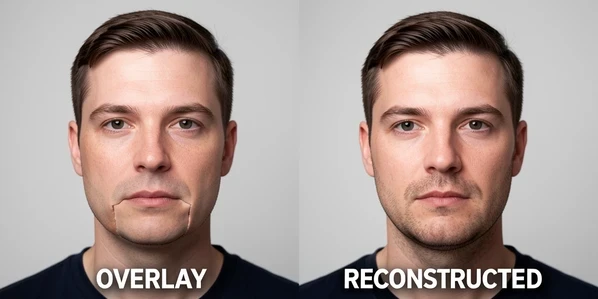
The oldest family does not reconstruct anything. Traditional face swap apps are rule-based overlays: they cut a face out, warp it to fit the target's landmarks, and paste it on top, as pixelbin notes. No model learns what your face is. The software just stretches pixels into position.
That is exactly why those early swaps looked like a flat mask stuck on a moving head. Lighting on the pasted patch rarely matched the scene. Skin tone jumped at the seam. Turn the head and the mask slid. AI tools fixed this by reconstructing the new face from facial structure, expression and movement instead of overlaying it, which is the dividing line between this family and every family that follows.
Autoencoder (encoder/decoder) swaps
This is the family most people mean when they say deepfake. A faceswap model is built from two parts: an encoder that compresses a face down to a compact vector, and a decoder that rebuilds a face from that vector, as the faceswap.dev community documents.
The clever bit is the training layout. One shared encoder learns a general sense of faces. Then two separate decoders are trained, one on person A's images, one on person B's. Feed person A's face through the shared encoder and into person B's decoder, and you get person A's expression rebuilt as person B. The expression carries over because the encoder kept it; the identity changes because a different decoder finished the job.
- Needs many images of each person, often hundreds to thousands, to train a usable decoder.
- Training is slow and identity-specific, so a model learns two faces, not faces in general.
- It underpins the classic trained deepfake pipeline that tools like DeepFaceLab made famous.
Because the model is locked to the two people it trained on, swapping in a third face means training again. That cost is the family's defining trait.
GAN-based swaps
GANs raised the realism ceiling. A generative adversarial network pairs two networks against each other: a generator that produces the swapped face and a discriminator that judges whether an image is real or fake, as framia explains. The generator tries to fool the judge. The judge tries not to be fooled.
Run that contest across many iterations and both sides sharpen. The generator learns to produce faces clean enough to slip past an increasingly skeptical discriminator, which is why GAN output looks far more convincing than a pasted overlay. Architectures like StyleGAN pushed the quality of generated faces hard in this direction.
GANs also earn their keep in video. Their generators drive the frame-to-frame tracking that many video tools rely on, holding the face steady as it moves rather than regenerating it cold each frame.
Diffusion-based swaps
Diffusion is the newest family, and it works backwards. A diffusion model is trained to reverse a noise-adding process: start from pure noise and denoise step by step until a coherent face emerges, as framia describes. Nothing is pasted. The face is grown out of static.
Left alone, that would generate any face. To make it swap, the process is conditioned on the source identity so the denoising converges on the right person. The payoff shows up at the boundaries. Diffusion is strong on edge quality and inpainting, filling the seam between the new face and the surrounding hair, ears and neck so the join stops announcing itself. Stable Diffusion is the best-known model in this lineage.
Where an autoencoder needs a gallery of one person and a GAN needs an adversarial training loop, a conditioned diffusion model can swap from a single source image. That shift is part of why single-photo swaps got so good so fast.
3D-reconstruction and texture mapping
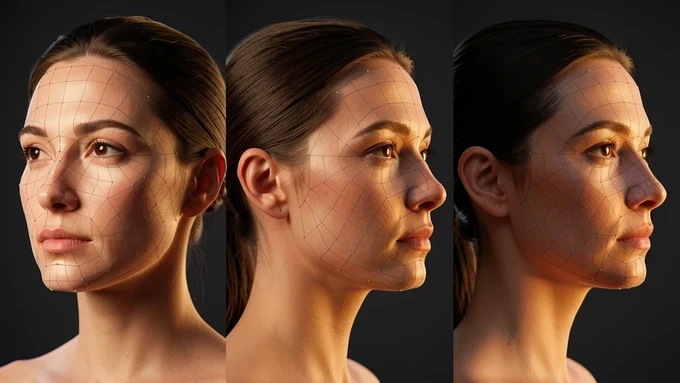
This family attacks the problem the overlay era could never solve: depth. Under every swap, three steps run in sequence, per framia: facial landmark detection, 3D face reconstruction, then texture mapping and blending.
Landmark detection is the anchor. It maps somewhere between 68 and 478 keypoints per face, marking eye corners, nose tip, lip edges and the jawline so the system knows where everything is and how it moves. Richer landmark maps feed the next step more to work with.
Then 3D reconstruction estimates the actual shape of the head, its depth, so the swapped face is fitted onto a surface rather than a flat plane. Texture mapping wraps the new skin over that geometry. The result holds up when the head turns. A flat overlay collapses to a sticker in profile; a depth-aware swap keeps the cheek and nose where a real face would have them.
Hybrid architectures (the 2026 default)
No single family wins on every axis, so leading tools stopped choosing. Many of the best-performing 2026 tools run hybrid architectures: GAN-based video tracking for temporal consistency layered with diffusion-based inpainting for edge quality, according to framia.
The logic is targeted. GANs hold the face stable across frames, which is video's hardest demand. Diffusion cleans the boundary, which is where swaps betray themselves. Bolt them together and each one patches the other's weak spot. Newer tools also lean on generative identity embedding, a learned representation of who the person is, in place of the old 2D overlay, so identity survives lighting and angle changes that would have broken a pasted face.
Picture a talking-head video. The GAN layer tracks the speaker's head as it bobs and turns; the diffusion layer keeps the seam clean frame after frame. That division of labor is the hybrid family in one sentence, and it is why a tool can belong to more than one family at once.
GAN and diffusion are not rivals to pick between. The strongest current tools treat them as two halves of one machine.
Photo vs video: where the technique choice bites
Still-image swapping is essentially a solved problem for well-matched source and target pairs, as lovart puts it. Give a single-image diffusion swap a clear, well-lit, similarly-angled face and the output is hard to fault.
Video is a different animal. It adds temporal consistency, the demand that the face stay coherent from one frame to the next. Miss it and the swap flickers, swims, or morphs between frames as the model regenerates a slightly different face each time. This is the failure photo-only techniques never have to solve, and it is the reason GAN tracking and hybrid methods matter most for footage.
How well can it be solved? Lovart's Video Face Swap claims 90%+ temporal consistency on well-lit, stable footage. Read the conditions, though. Well-lit and stable is doing real work in that sentence; shaky, dim or fast-cut video pulls the number down.
Why the same technique gives different results
Swap quality is not luck, and it is not mainly about which family you picked. It tracks the input. Output quality depends on source resolution, lighting, face angle, expression and image clarity, per kirkify. Feed any family a bad source and it degrades; feed it a clean one and even older methods do well.
Resolution sets the hard ceiling. A documented test by kirkify graded the same swap across sizes:
| Source resolution | Result |
|---|---|
| 2000x2000px | Excellent |
| 800x800px | Good |
| 300x300px | Mediocre |
| 150x150px | Terrible |
Below roughly 300x300px even the strongest family falls apart, because there is simply not enough facial detail to reconstruct. Resolution is the input that no clever architecture can rescue.
Video stacks more ways to fail on top. Lovart names six recurring failure modes:
- Lighting mismatch between source and target, so the swapped face is lit from the wrong direction.
- Angle extremes, where the head turns past what the source ever showed.
- Resolution mismatch.
- Occlusions, when a hand, hair or mic crosses the face.
- Skin tone mismatch.
- Expression mismatch.
Each of those traces back to the input or the scene, not to a flaw unique to one technique family. Match the source to the target on these six fronts and almost any modern method delivers. Ignore them and the most advanced hybrid still struggles. That is the practical takeaway under the whole taxonomy: the technique sets the ceiling, the input decides how close you get to it.
so does any of this actually run on a phone or is it all desktop with a real gpu? the whole guide reads like you need a workstation
of course it's desktop. you think your phone is training two decoders on hundreds of images lol
i mean the diffusion single photo thing, that's the part i thought might work on mobile
single image diffusion runs server side in basically every app i've tried. the phone just sends the photo up and gets the result back, nothing heavy happens on device
wait so when i do a swap in an app on my phone it's not even my phone doing it?? lol mind blown
correct and that's the whole privacy problem. your face goes to their gpu not your pocket. on desktop at least you can run faceswap stuff fully local
+1 on that, the mobile apps are all cloud
to be fair a few do on device inference now but it's a stripped down model, quality drops hard vs the desktop pipeline
stripped down is generous. mobile output looks like the 300x300 row in that table, mediocre at best
the resolution table was the only part i actually remember from this
ok but desktop tools cost money or need a gpu i don't have, so mobile is the only option for some of us
same boat. cheapest used card that runs this stuff ok is still like 190 here
does deepfacelab run on a laptop? saw it mentioned
deepfacelab on a laptop is pain. it's the autoencoder family so you're training per identity, hundreds of images, your fan will scream. desktop with a proper card or don't bother
oof ok thx
i gave up on the desktop route entirely. spent a weekend on deepfacelab, two faces, looked terrible, never touched it again
yep the per identity training killed it for me too. who has hundreds of clean images of someone
that's exactly why diffusion took over for casual use. one source photo and you're done, no gallery no training. the autoencoder route is for people who need a specific locked pair
and conveniently the one source photo route is the one that has to phone home...
reading this on my phone and the irony is not lost
the article never even mentions mobile vs desktop btw, we invented this whole thread
because that's the part people actually care about? i don't care if it's a gan or diffusion, i care if it runs on my phone for free
those aren't unrelated though. gan tracking is what holds video stable and that's the heavy part that won't run on a phone in real time
real time on mobile is the real question. anyone got it working live not just on a saved clip?
live on mobile, no. closest i got was a 14 second clip rendered server side, took about 38s. not real time by any definition
figured. thanks
the 90% temporal consistency number is desktop footage though, well lit and stable. on a phone handheld it's going to be way under that
what's temporal consistency again? lol sorry newbie here
i think it's like the face not flickering between frames? someone correct me
close enough. face stays the same person frame to frame instead of morphing. it's the thing photo swaps never have to deal with
ohh that makes sense ty
nobody's worried where the video goes? you upload a clip of someone's face to a random app's server and just trust it gets deleted
this. on desktop i can air gap the whole thing. on mobile you're trusting a privacy policy you didn't read
meh i'm not swapping anything sensitive
until the app gets breached and your face is in a training set somewhere
ok now i'm a little spooked
anyone found a desktop tool that's actually free though? everything good seems to want a sub
free and good don't coexist here. the free ones are the rule based overlay junk, mask sliding off in profile
the sticker in profile thing yeah, i've seen that on the free phone apps. turn your head and it falls apart
that's the no depth problem. flat overlay has no 3d reconstruction so the second you go past front facing it collapses
so the good ones build a 3d head? that's wild
the depth aware ones estimate head shape yeah, holds up when you turn. but again compute, which loops back to why your phone app is the cheap flat version
tried one of the paid mobile subs for a month, cancelled. quality was barely better than free and it still couldn't handle my hair crossing my face
occlusion strikes again. hair, hand, mic, anything over the face and they all choke
the worst part was it charged me twice, billing through the app store was a mess
wait double charged? which app
won't name it but it was one of the big ones, support never replied
that's a dead end then lol
is stable diffusion the one that does the single photo swaps? saw it in the article
stable diffusion is the diffusion family example yeah, that's the single source one. stylegan was the gan one
stylegan does the swaps directly though, not just generating faces
honestly half these names blur together for me. gan diffusion autoencoder, idk
you don't need the names. you need does it run where i am and does it look ok. everything else is trivia
trivia that decides whether it works on your phone or not though
on phone in the subway right now, gonna try a free one when i get home and report back
the 85% of apps use ai stat, on mobile i'd bet it's way lower. so many phone apps are still the paste on kind
probably, the store is full of the old overlay apps with a fresh ai sticker on the listing
marketing fluff mostly. ai powered on the badge, rule based warp underneath
sounds like a press release that whole akool stat tbh
what counts as ai here anyway, isn't warping pixels also an algorithm lol
fair point but the article's line is reconstruction vs overlay. if it rebuilds the face from structure it's the ai side, if it just stretches pixels it's the old family
ran a test ages ago, fed the same face at 2000px and around 312px, the small one was unusable. might be misremembering the exact size but the gap was huge
matches the table, below 300ish it falls apart no matter the model
and phone cameras are fine for source res at least, mine shoots way over 2000
source res isn't the phone problem, it's the compute to process it. you've got a great source and a weak engine on mobile
or a great engine on someone else's server reading your great source. pick your poison
i'll be honest i skimmed the 3d part, got lost. is that only for video?
helps anywhere you turn the head, photo or video. flat overlay is the one that only survives front on
after all this i think i'm just sticking to desktop when i bother at all, mobile burned me enough
desktop if you can afford the card, that's the catch for half of us
so is there literally one app that does decent swaps on a midrange android without sending my face to a server, or am i dreaming