
Viggle AI tested: meme engine, paywall math, and the verdict
Viggle AI is worth it if you make trend-chasing meme and dance videos and accept what it really is: a motion-transfer character-swap engine, not a still-photo face swapper. The free tier handles casual experiments at 3-5 watermarked 720p clips a day. Pro at $9.99 a month is the honest entry point for clean output. Live and Max only earn their price for streamers and high-volume creators. Below is the credit math, the real processing times, and the traps that competitors skip.
What Viggle AI actually is (and isn't)
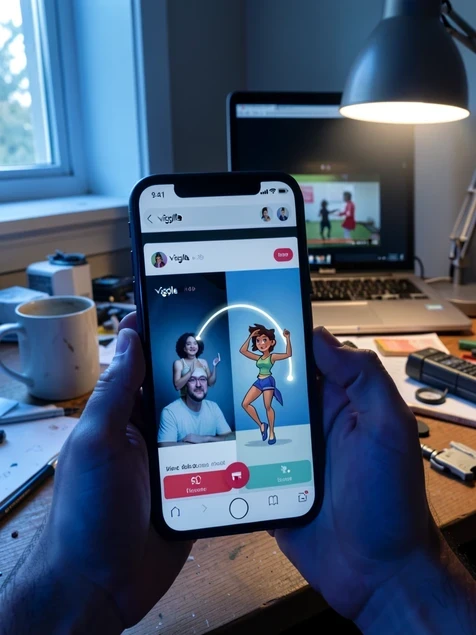
It animates a single static photo using the motion from a reference video. You hand it one image and one motion source, and it transfers the movement onto your subject. TechRadar describes this motion-transfer approach as the core of the tool, built on a 3D physics model called JST-1 from a Canadian startup. No rigging, no keyframes, no animation experience needed.
That single distinction reframes everything. Most tools in this category, Reface and DeepSwap among them, paste a new face onto an existing clip. Viggle moves a whole character. The workflow is deliberately narrow: pick a photo, pick a motion or template, generate. It was built around viral meme formats and TikTok dance trends, so the templates lean hard into whatever is trending that week.
If you arrived expecting to swap a face onto a video in one tap, you are using the wrong mental model. Viggle drives the entire body, which is why it shines on dances and stumbles on subtle facial work.
Free tier reality: what 3-5 daily clips really get you
Sources disagree on the exact number, and that gap matters. Filmora's review counts three free generations a day; Viggle's own App Store listing advertises up to five. Either way you hit a hard 24-hour cooldown once the quota is spent. Free users on mwm.ai report getting two or three videos before the wait kicks in, with finished clips quietly archived.
Then come the constraints that bite later. Every free export carries a watermark and tops out at 720p, and the license is personal use only. Uploads are capped at 1 minute or 50MB, per TechRadar. The detail most people miss until it stings: free storage lasts seven days. After that your clips expire. Make something you love on Friday, forget to download it, and by the next weekend it is gone.
- Daily cap of 3-5 generations, then a 24-hour cooldown before the next batch.
- Watermarked 720p output licensed for personal use only.
- Uploads limited to 1 minute or 50MB per file.
- Free clips auto-expire after seven days unless you save them locally.
Pricing and credits: Pro, Live, and Max compared
Paid plans run on credits, and the math decides which tier fits. Filmora lists three subscriptions: Pro at $9.99 a month with 80 credits and 4 active generations at once, Live at $19.99 with 200 credits and 6 active jobs, and Max at $79.99 with 800 credits and 10 active jobs. Each generation spends credits, so your real ceiling is how many clips those credits buy, not the daily count.
| Plan | Price / month | Credits | Active jobs | Output |
|---|---|---|---|---|
| Free | $0 | Daily cap of 3-5 clips | Queued | 720p, watermarked |
| Pro | $9.99 | 80 | 4 | 1080p, no watermark |
| Live | $19.99 | 200 | 6 | 1080p + 6-hour live session |
| Max | $79.99 | 800 | 10 | 1080p + unlimited live session |
Paying buys more than resolution. Every tier above free unlocks 1080p with no watermark, permanent asset storage instead of the seven-day purge, and commercial-use rights that the free license withholds. Live adds a six-hour real-time session window; Max removes the session limit entirely.
One catch the pricing page soft-pedals: a subscription does not unlock everything. Certain character templates still demand extra paid purchases on top of your monthly fee. Budget for it if a specific trending template is the whole reason you signed up.
The features that matter: Mix, Multi, Move, Mic, Rap, and Live
Six modes cover almost everything a meme creator touches. Mix is the headline act: drop a single photo to replace anyone in a video, or insert yourself into a template scene. It is the cleanest of the bunch. Move animates a still image straight from a reference video's motion, which is the purest expression of what Viggle does.
- Multi (Editor) swaps several characters across scenes in one video, handy for group memes but rougher than Mix.
- Mic makes a character talk or sing with lip-sync from typed text, your own voice, or library music.
- Rap turns a photo into a rap clip with custom or AI-written lyrics, lip-synced to the beat.
- Viggle Live streams a real-time webcam character swap straight to Twitch, YouTube, Kick, or OBS with no rigging.
Feeding all of it is a library of 8,000+ templates spanning dances, NBA highlights, soccer moments, and whatever meme is peaking, according to the App Store listing. That library is the real reason quick, shareable clips are so easy here. Pick a trending template, supply one face, and you have a post in minutes without opening an editor.
Speed and reliability: real processing times and failures
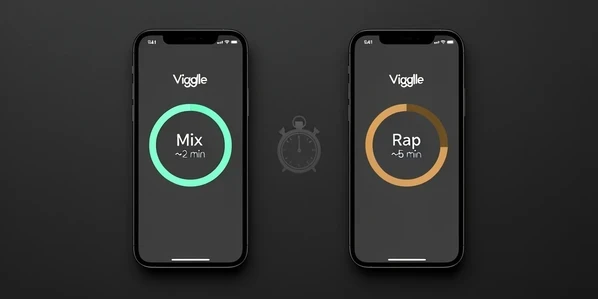
Speed depends entirely on the mode. In Filmora's hands-on testing, Mix and Multi-Track usually finished in up to about 2 minutes, while Rap could stretch to roughly 5 minutes. Those are paid-tier, low-queue numbers. On free, expect worse: one Play Store reviewer reported an 11-minute video still stuck 'in draft' an hour after submitting it, because free jobs sit behind everyone else in the queue.
The failure that hurts most is wrong-character output. App Store reviewers describe generations that pull the completely wrong person from an uploaded photo, burning a credit on a clip you cannot use. There is no real fix beyond a clean retry: use a single, well-lit, front-facing photo with one clear subject and resubmit. On paid tiers a wasted credit is a small annoyance; on free it can cost your whole day's quota.
Two more friction points show up by region. Some users behind a VPN or in certain regions hit upload failures outright. Others run into low-MB 'not enough storage' errors that block uploads even when the file looks small. If an upload refuses to start, drop the VPN and shrink the clip under the 50MB free ceiling before blaming the app.
Deepfake ethics, copyright, and the template-music trap
Here is the trap nobody warns you about. App Store reviewers report receiving copyright notifications from Facebook over the music baked into Viggle's own templates, with their ad revenue redirected to the rights holders. You chose a template, not a song, and still got flagged. If you monetize, mute or replace template audio with a track you actually own before posting.
The same logic extends to your source material. PixieBrix notes that using third-party videos or music as motion sources requires rights clearance, since you are reusing someone else's footage. Viggle's terms, per TechRadar, prohibit generating harmful or defamatory content and breaching intellectual property rights. And remember the licensing wall: free outputs are personal use only, so any commercial post needs a paid plan first.
Consent is the quiet line here. Driving a real person's likeness with motion from a video they never agreed to appear in is exactly the kind of use the terms are written to discourage.
Privacy: what Viggle collects from your photos
The Play Store data disclosure is specific. Viggle may collect personal info, photos and videos, and device or other IDs. On the upside, that data is encrypted in transit and you can request deletion. Apple's App Store listing goes further, flagging data both used to track you and linked to your identity, which is worth weighing before you upload pictures of friends or family.
- Developer of record is Warpengine Canada Inc., based in Toronto, Canada.
- Play Store collection covers personal info, photos and videos, and device IDs, encrypted in transit.
- App Store lists data used to track you and data linked to you.
- Free storage clears after seven days; only paid plans keep your assets permanently.
Featured snippets claim Viggle does not retain face data after generating your video. Treat that as the company's stated position, not a guarantee, and let the store disclosures above set your real expectations. If a photo is sensitive, the safest move is simply not to upload it to any cloud tool.
Verdict: who Viggle is worth it for
Buy it for trends, skip it for face swaps. Viggle is the strongest pick for creators chasing meme and dance formats who understand they are using a motion-transfer character-swap engine. If your goal is a quick, high-fidelity face swap on existing footage, a dedicated tool like DeepSwap or Reface will serve you better, and Krikey AI is the closer match when you need true 3D-depth animation rather than 2D motion transfer.
| You are | Right plan | Why |
|---|---|---|
| A casual meme maker testing the waters | Free | 3-5 clips a day is enough to learn the workflow before paying |
| A regular creator who posts clean content | Pro ($9.99) | 1080p, no watermark, commercial rights, permanent storage |
| A streamer or high-volume poster | Live or Max | More credits, more active jobs, and the live-session window |
| Someone who just wants a fast face swap | A different tool | Viggle animates whole bodies, not quick still-photo swaps |
So the free tier is genuinely fine for experiments, as long as you download before the seven-day clock runs out. Pro is where serious output starts. Live and Max are streamer and agency tools, not impulse buys. Match the plan to how often you actually post, factor in the odd extra-paid template, and Viggle stops feeling like a paywall and starts feeling like a fair trade.