
Why your Seedream 4.0 face swap keeps rewriting hair and clothes (and how to stop it)
You asked Seedream 4.0 to swap a face. It also gave the subject a new haircut and a different jacket. The fix is almost never the model: it is the prompt. Name the hair and outfit as things that must not change, bound the edit to the face, lock the seed, and hold denoise at 0.25-0.40 with CFG between 4.5 and 6.0. Do those four things and the hairstyle and clothing stop drifting on the next run.
Why a Seedream 4.0 face swap changes the hairstyle or outfit
One mechanism explains it. You told the model what the new face should look like and said nothing about the hair or the clothes, so it read those as fair game and reinterpreted them. Silence is permission here.
Diffusion works by balancing your prompt against everything it learned in training. When the prompt is vague, that balance tips toward the learned priors, and the model fills the unspecified parts with whatever looks plausible while keeping the general vibe intact, per 10b.ai. A short, mood-based prompt hands hair and wardrobe straight to those priors.
And a face swap is really an edit with a boundary. If you never draw that boundary, the edit has nowhere to stop, so it bleeds outward from the face into the hairline and then the collar. The next three fixes each close one of these gaps, in the order they cause trouble.
First fix: add a lock line that names hair and clothing
Lead the prompt with a single sentence that lists what stays. The team at magichour.ai recommends an explicit lock line up front naming the face, hair, earrings, any label text, and the pose as unchanged. This is the highest-yield change you can make, and it costs one line.
Paste this and edit the specifics to match your shot:
Keep the same hairstyle (length and part side), the same outfit, earrings and pose unchanged; only swap the face.
Notice what the line does. It pins the hairstyle by its measurable traits, length and part side, instead of trusting the word "same" to carry meaning. Vibe prompts like "keep her looking consistent" fail because the model has no anchor to hold. Concrete wardrobe and hair anchors give it one.
A common case: you swap a face and the leather jacket comes back as a denim one. Add the same black leather jacket, zipped to the lock line and the outfit holds across runs. The more specific the noun, the less room the priors have to invent.
Second fix: limit the edit scope to the face only
Tell the model where it is allowed to work. Add a scope phrase like "edit the face only" or supply a mask over the face, the same way magichour.ai suggests "edit background only" plus a mask to keep a subject from drifting. A bounded edit physically cannot rewrite hair it was told not to touch.
Group photos need one extra step. With several people in frame, name the exact person or position so the swap lands on the right face: "swap the face of the woman on the left only." Skip that and the model may change the wrong person, or change two.
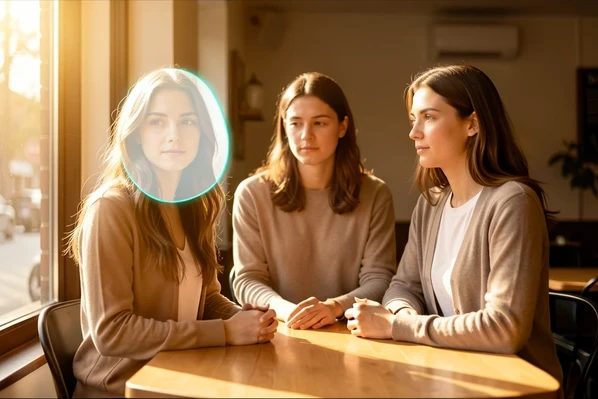
One rule ties this together: change one thing per prompt. Swap the face, or move the scene, never both in a single pass. Skywork.ai found that stacking requests, a new pose plus a new location, makes Seedream lose coherence and start rewriting details you wanted kept. Split the work into two clean steps.
Third fix: dial in the settings that hold hair and outfit
Settings drift hair as quietly as a vague prompt does. Start with the seed. Lock it and reuse the exact same value across the whole set, because a fresh seed snaps the face to a nearby but different identity, and new hair tends to ride along, according to 10b.ai.
Two numbers do most of the heavy lifting:
- Denoise strength 0.25-0.40. Push past 0.5 and the model starts editing bone structure and hair along with it (10b.ai).
- CFG / guidance 4.5-6.0 for portraits and edits. Above roughly 6.5 the output snaps hard toward the model's priors and nudges identity.
There is a counterintuitive trap with appearance lock. Set it too high and every image overfits, so the model rewrites the surrounding details to compensate, which is why outputs can look plastic yet still shift the hair. Drop the appearance lock to 65-70% and nudge the seed, advises sider.ai. Raise it again only if the face itself starts drifting, and pair that with "consistent facial proportions."
A drift-free baseline that works: seed locked, denoise 0.30, CFG 5.0, appearance lock around 68%. Change one of these per attempt when you tune, never several together, so you can see which knob did what.
Fourth fix: use one strong reference, not a collage
Feed the model one clean, sharp frontal or 3/4 anchor image rather than a stack of weak references. A collage confuses role assignment: the model cannot tell which hair and which outfit it is meant to preserve, so it averages them into something new.
Order matters too. Upload every reference before you write the prompt, so the model has assigned each image a clear role by the time it reads your instructions. Seedream 4.0 reads up to 6 reference images and outputs native 4K, while Seedream 4.5 takes up to 10 and runs about 40% faster, per magichour.ai. More slots is not more clarity. One good anchor beats six muddy ones.
If the jaw or hair begins to slip mid-set, re-inject your original shot as a low-weight secondary reference, a quiet checkpoint that pulls the result back toward the real face without overpowering the main prompt. Keep one hairstyle baseline, the same length and part side, constant across the whole run; wild hair changes fool the model into reading a new identity.
Recovering the original hair and outfit after they've already drifted
Already lost the look? You can claw it back, and most guides never tell you how. The foundation is a clean base image: generate one single-subject shot with clear lighting and no busy background, then treat it as the anchor for every edit that follows, as skywork.ai describes. If you have one good frame from earlier, that is your base.
Re-run the swap from that last good frame. Bring back the lock line and this time describe the original outfit explicitly, by color and material, rather than hoping the model remembers it. The frame carries the hair; the words carry the clothes.
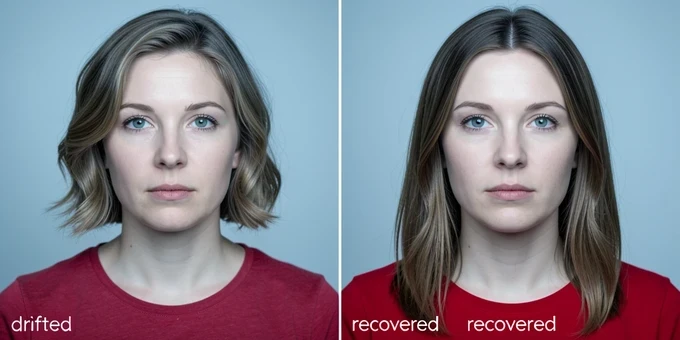
When you correct drift, move one weight at a time. Lower the denoise, look. Then adjust the reference weight, look again. Changing several settings at once tells you nothing about which one fixed the hair, and you burn credits relearning the same lesson.
Quick troubleshooting checklist
Run these in order. The first cause is the most likely, so start at the top and stop as soon as one fixes it.
- No lock line? Add one that names the hair and outfit as unchanged.
- Unbounded scope? Add "edit face only" or supply a face mask.
- Settings too aggressive: lock the seed, set denoise 0.25-0.40, hold CFG 4.5-6.0.
- Too many references, or none? Switch to a single strong anchor image.
- Too many changes at once? Make one change per prompt.
Keep a reusable lock line saved somewhere you can paste it into every swap. That one habit, plus a constant hairstyle baseline across the set, prevents most of the drift you would otherwise spend credits chasing back.
spent two days fighting this. every swap gave my subject a buzzcut and i was losing my mind
same here, mine kept turning a hoodie into a blazer lol
it's the prompt like 99% of the time. you say nothing about the hair so the model reads it as free to repaint
the lock line is the whole game honestly. i name length and part side every single time now
tried 'keep her consistent' for weeks and it never held. felt kinda stupid reading this and finally getting why
wait the part side actually matters? mine always flips the part and i never connected it
denoise is the quiet killer. push past 0.5 and it starts editing bone structure not just the face
i sit at 0.32 denoise, cfg 5.0, seed locked. drift basically gone across a 47 image set
ngl i never locked the seed before this and that alone fixed half my problems
the appearance lock trap is real, cranked mine way up once and everything came out plastic but the hair STILL shifted
drop it to like 68 and nudge the seed, that's the fix. only raise it again if the face itself starts slipping
mask over the face beats the text scope phrase imo. 'edit face only' still leaked into the hairline for me a couple times
group photos are a nightmare though. swapped the wrong woman twice before i started naming the position
skimmed it ngl, how many reference images is it supposed to be? i always dump like 8 in
@5-Minute Crafts that's literally your problem, 4.0 reads up to 6 and a collage just confuses role assignment. one clean anchor
8 refs is why your hair averages into mush. and upload the anchor before you type the prompt, the order matters more than people think
the re-inject trick saved a whole set for me. dropped the original frame back in at low weight and the jaw came right back
the one change per prompt rule is the part nobody actually follows. new pose plus new background in one pass and seedream just falls apart
ok so the jacket thing. added 'black leather jacket zipped' and it finally stuck. crazy you have to be that specific
had a weird case once where even a locked seed drifted on a 3/4 profile shot, long story
reading this on lunch, gonna rewrite my whole lock line tonight from desktop
does anyone actually know if 4.5 holds outfits better or is it just faster? not sold on upgrading
4.5 takes 10 refs and runs roughly 40% faster but more slots isn't more clarity, still feed it one anchor
the recovery part is underrated. generate a clean single subject base first then anchor every edit to it, most guides skip that completely
anyone ever gotten the original outfit back purely from words after it drifted, or do you always need a good frame to re-run from?