
Swapface for live streaming: a real-time face swap put to the streamer test
Short answer: Swapface can give a streamer a convincing real-time face-swap persona, but only with serious GPU horsepower behind it, and only if you treat the billing system with caution. The app is light, fast to start, and currently free with credits. The catch sits on Trustpilot, where a 2.5 score and several recurring-charge complaints turn the buying decision into a trust question rather than a feature question. If your card stays out of it, the downside shrinks to hardware. If it goes in, you inherit the risk other reviewers describe.
Swapface in one minute: what it is and who it's for
Swapface is a real-time face swapper built for going live. You pick a face, hit START, and the swap runs on your camera feed during streams, video chats, Omegle sessions, and Teams calls. There is no model training step, which is the part that scares people off rival deepfake tools. Beyond the live feed it also handles one-click HD image swaps and video or GIF swaps of any length.
The target user is obvious from the design. Twitch streamers, VTubers chasing an instant persona, and anyone who wants a different face on a video call without learning a node graph. That convenience is the whole pitch. Whether it holds up depends almost entirely on the machine underneath it.
Real-time performance and the GPU reality
Here is the honest part most product pages skip: smooth real-time output is gated by an expensive graphics card. The app itself is tiny, roughly 300M, and Swapface notes it can even run on a CPU alone. That CPU-only mode is fine for tinkering. It is not fine for a watchable stream. Without a powerful GPU, users report the swap lagging behind their movements and pixelating under motion, which is exactly the on-camera failure a streamer cannot hide.
Swapface publishes two hardware tiers, and the gap between them is the gap between a demo and a broadcast. The minimum spec gets the app open. The recommended spec, paired with the 4070 Ti note from the Swapface blog, is what actually carries a live stream at a frame rate viewers will tolerate.
| Tier | CPU | RAM | GPU | What it means on stream |
|---|---|---|---|---|
| Minimum | Intel Core i5 11400 or Ryzen 5 3600 | 16 GB | NVIDIA GeForce RTX 2070 or Radeon RX 5700 | Runs, but expect visible latency and pixelation under fast motion |
| Recommended | Intel Core i7 or Ryzen 7 | 32 GB | High-end NVIDIA GPU, RTX 4070 Ti or higher | Fluent real-time swap suitable for live broadcast |
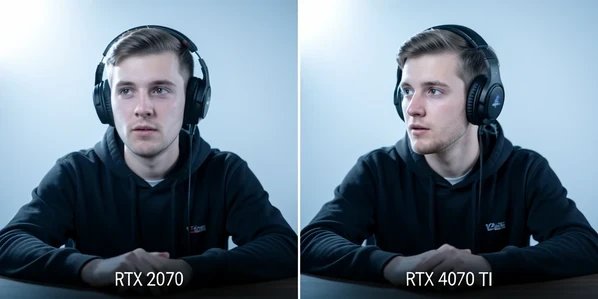
So budget honestly. An RTX 2070 will let you test the persona and judge the look. A 4070 Ti-class card is what keeps the face glued to yours when you lean forward, laugh, or whip your head toward a second monitor. The community knows this. One commenter cheering an RTX 5000 build summed up the priorities: the hardware first, the face swap second.
Platforms and streaming-app compatibility
Swapface runs on Windows 10 Anniversary Update or newer, macOS on Apple Silicon, Android, and the web. On the streaming side it feeds the apps you already use: Twitch, YouTube, Zoom, Teams, and Omegle. The plumbing is the same trick every live face tool relies on, a virtual camera that other apps treat as a normal webcam.
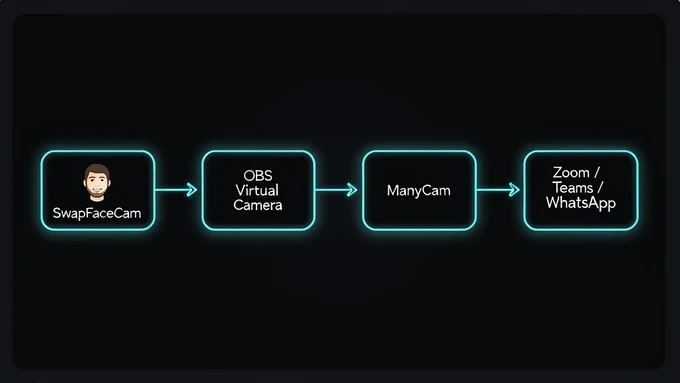
The routing path is worth knowing before you go live. You expose the swapped feed through SwapFaceCam or the OBS virtual camera, then select that as the camera inside your destination app. For chat apps that do not list it directly, the documented chain runs through ManyCam: pick the OBS virtual camera as ManyCam's source, then point WhatsApp or Messenger at ManyCam. In OBS itself, add the SwapFaceCam source, click Start Virtual Camera, then choose OBS Virtual Camera under the camera setting in Zoom or Teams.
One quiet upgrade: skip the cheap USB webcam. Swapface supports a phone as the camera through iVCam or Iriun, and an iPhone as a camera on Mac. A modern phone sensor feeds the swapper a cleaner source frame than most budget webcams, and the swap quality tracks the input quality closely.
Output quality and its limits
Real-time swapping is harder than photo swapping, and Swapface shows the seams. Blending can turn rough around the eyes and mouth, the two areas viewers stare at most, and the face sometimes blends only partially. Why does this happen? The model is solving each frame in milliseconds with no chance to refine, so high-detail, fast-moving regions are where it cuts corners.
Some failure modes are predictable enough to design around:
- Glasses and other face obstructions break the effect, because they sit between the camera and the facial landmarks the swap needs to lock onto.
- A low-quality webcam sharply degrades the result, since the swap can only be as sharp as the frame it receives.
- Fast head turns and extreme angles are where partial blends and smearing show up first.
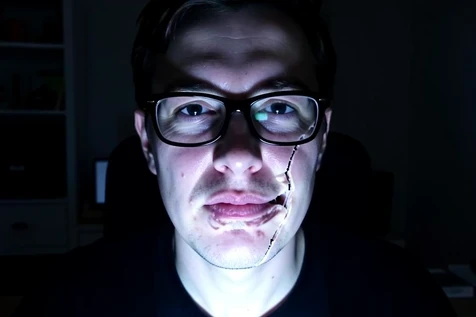
On the flip side, Swapface bakes in beauty and face-shape filters that reshape your features during the swap, useful for nudging an unconvincing blend toward something cleaner. The obvious missing controls are a masking tool and a blend-percentage slider, both of which the community keeps asking for. Until they arrive, your fix for a rough swap is mostly upstream: better camera, better light, no glasses.
Pricing, free credits, and the billing complaints
Swapface markets itself as totally free right now, handing out free credits, with downloads for Windows and Mac on Apple Silicon. Paid users get one extra lever: they can activate acceleration for better real-time performance. So far, so reasonable. The free build lets you judge the tool before spending anything.
Then you read the reviews. Swapface sits at 2.5 on Trustpilot across 8 reviews, and the criticism clusters on one nerve: money. Multiple reviewers allege unauthorized recurring credit-card charges, with one reporting a loss of more than $500. Others describe refund requests that went ignored and support that simply could not be reached to cancel a subscription. For a tool you might pay for monthly, that is the single most important data point in this review.
Reviewers describe being charged on a recurring basis without clear authorization, then unable to reach anyone to cancel or claw the money back. One puts the loss at over $500. Set that next to the app's own line that "all procedure and data is running on your local machine."
The practical defense writes itself. Stay on free credits while you evaluate. If you must unlock acceleration, fund it through a virtual or single-use card you can burn, not your main payment method. Given the documented refund friction, getting your money back later is not a plan you want to rely on.
Privacy: the local-processing claim vs the account/billing system
Swapface's headline privacy promise is strong: all procedure and data run on your local machine, so only you have access to your data. For a face tool, on-device processing is genuinely the right architecture, and it is a real point in the app's favor over cloud swappers that upload your likeness.
But that promise lives next to an account and billing system, and the two pull against each other. Local processing of frames does not mean local handling of your identity and card details. The company behind the app is listed as DeepFuture Limited at a Los Angeles address, and once a credit account exists, you are trusting an organization, not just your own GPU. The billing complaints above are what that trust looks like when it fails. On-device pixels, off-device payments: judge the privacy claim on the narrow thing it actually covers.
Best alternatives for real-time streaming
If Swapface's hardware demands or trust profile do not fit, two real-time options stand out for different reasons. DeepFaceLive is open-source and has been forked close to 1,000 times, free for streamers willing to handle a fiddly technical setup. Real Deep takes the opposite path on trust: it runs entirely offline, sends no data to servers, and keeps working in airplane mode after first launch, which sidesteps billing risk completely. LiveSync and SwapStream round out the real-time, streaming-focused field if you want a more conventional account and support model.
One caveat applies to all of them. Putting someone else's face on your stream without their consent can be illegal, so keep the persona to faces you have the right to use.
Verdict: should a streamer use Swapface?
Swapface earns a qualified yes for one specific streamer: someone with an RTX 4070 Ti-class GPU who installs the free build, tries the persona, and never saves a card. For that person it is a capable, lightweight, genuinely fun real-time swapper that does the job rivals overcomplicate.
Walk away if either condition breaks. Without the GPU horsepower, the lag and pixelation will undercut your stream no matter how good the concept is. And if you are not willing to risk the documented billing problems, do not hand over a real payment method, use a virtual card or stay on free credits. The tool is good. The company's billing track record is the reason to keep your wallet at arm's length.