
Is Pixlr's AI face swap worth paying for?
Pixlr's AI Face Swap is not free, works on single-face still images only, and earns its keep only on the Premium plan. The free tier cannot run it at all. Plus unlocks it for $1.49 a month billed annually but hands you just 80 monthly AI credits shared across every AI feature, which empties fast. Premium, at $6.49 a month annually with 1,000 credits, is the realistic entry point for regular swapping. There is no video, no multi-face, and a privacy catch on the free plan. Below: the per-swap math, the quality ceiling, and the cases where a rival tool wins.
What is Pixlr AI Face Swap and what can it actually do
Pixlr's AI Face Swap does one thing: it lifts a face from a source photo and blends it onto a single target face in a still image. No video. No group shots with several faces at once. You reach it through Pixlr Express, the company's lightweight browser-based AI editor, and the tool matches skin tones and lighting as it composites the two images, which is the whole of its facial feature blending.
- Output lands as a flat PNG, ready to download.
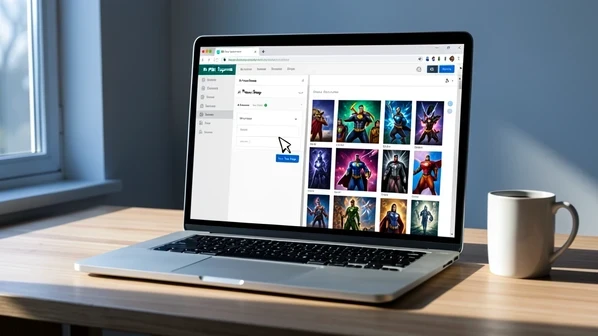
- The template library spans superheroes, fantasy, adventure, fashion, lifestyle, and art, so you can drop a face onto a themed scene without sourcing your own target image.
- Gender Swap flips presentation in a single click.
- Professional Headshot Creator is the sibling feature aimed at LinkedIn and resume photos.
Is Pixlr face swap free? Which plan unlocks it
No, not on the free plan. Face swap is gated behind Plus, the cheapest paid tier, so the version most people sign up for first cannot run a single swap. That detail trips up new users who assume a freemium photo editor includes its headline AI trick.
The free tier frustrates before you even reach the locked feature. You get three saves per day on mobile, ads every session, and a quieter catch: any AI image you generate on the free plan is added to Pixlr's public library, where other users can browse, like, or download it. Plus is the entry point that unlocks face swap and clears out the ads.
Pixlr pricing breakdown: what each plan gives you for face swapping
Plan tiers matter here for one question: how much face swapping each one buys. Prices below are verified against Pixlr's pricing page.
| Plan | Monthly | Annual (per mo) | Monthly AI credits | Face swap | Private Mode |
|---|---|---|---|---|---|
| Free | $0 | $0 | Limited | No | No |
| Plus | $2.49 | $1.49 | 80 | Yes | No |
| Premium | $9.99 | $6.49 | 1,000 | Yes | Yes |
| Team | $16.99 | $11.99 | 1,000 per seat (5 seats) | Yes | Yes |
| AI Credit Pack | $2.99 / 200 credits | n/a | +200, never expire | n/a | n/a |
Two policies shape the real cost. Cancel a subscription and your remaining monthly credits reset to zero, but the $2.99 AI Credit Pack of 200 credits never expires and survives cancellation, kicking in only after your plan credits run dry. Refunds are off the table too: Pixlr states it 'is unable to process any refunds for your subscription once your payment has been processed.'
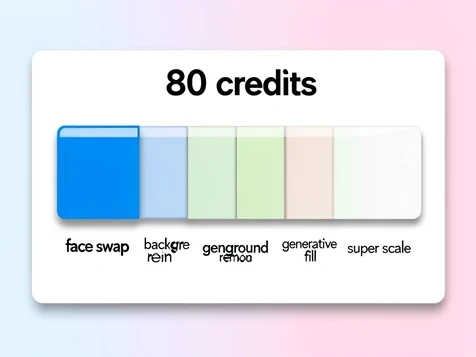
Here is the figure Pixlr will not publish: how many credits a single swap consumes. The company lists monthly credit totals but never the per-operation cost, so any swap count is an estimate until you test it. Assume, conservatively, that one swap draws around four credits, the kind of hit a single AI generation tends to make. At that rate Plus delivers roughly 20 swaps a month, and that is before background removal, generative fill, or Super Scale take their cut from the same 80-credit pool. Premium's 1,000 credits stretch to about 250 swaps on the same assumption, which is why it is the only tier where volume stops being the worry. Test your own rate before committing.
How Pixlr face swap works: step-by-step workflow
The flow is short enough to learn in one sitting.
- Upload a source face photo, then pick a target: either a second photo or a ready-made template from the library.
- Hit 'Run Face Swap' and let Pixlr composite the face, matching skin tone and lighting to the target.
- Download the result as a PNG.
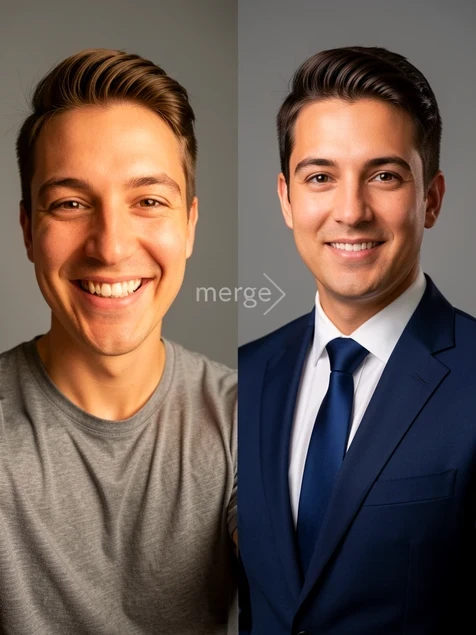
The Professional Headshot Creator runs a parallel workflow: feed it a clear face photo plus a professional attire photo, and it merges the two into a polished headshot for LinkedIn or a resume. Gender Swap is simpler still, a one-click presentation change. One caveat sits behind all of it. Faces shot at an angle, or partly hidden behind hair, hands, or glasses, break the blend, and accuracy drops fast the further you get from a clean frontal shot.
Output quality: what Pixlr face swap results actually look like
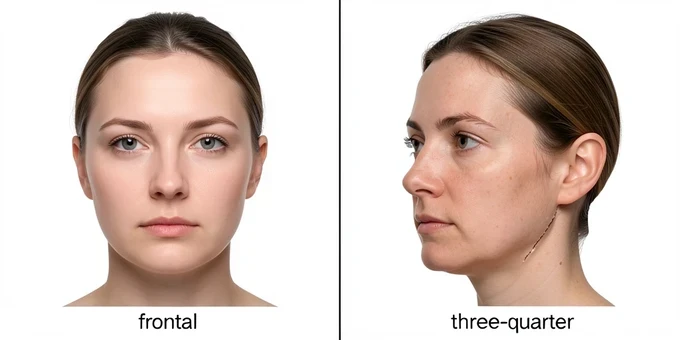
Results live or die on the source photo. The AI's whole job is skin tone matching and a lighting blend, and on a sharp, well-lit frontal selfie it does that convincingly. Push it toward a three-quarter angle, a low-resolution input, or a face half-covered by glasses and the seams show: mismatched jawlines, a faint halo at the hairline, skin that does not quite agree with the target.
Two things Pixlr never states are worth knowing before you pay. There is no documented maximum input resolution for face swap uploads, and no public word on whether free-trial outputs carry a watermark that paid plans remove. On speed, Pixlr X loads in roughly 1.2 seconds and background removal finishes in about 3.6 seconds, but face swap processing time is not separately documented. As for reputation, the iOS app holds a 4.4 from around 5,000 ratings, a far warmer reception than its 1.7 from 135 Trustpilot reviews. That gap matters: the Trustpilot anger targets billing and support, not swap quality.
Privacy and data handling: what happens to your face photos
Your free-plan creations are not private. Any AI image generated on the free tier joins Pixlr's public library, where any other user can find and download it. Private Mode shuts that off, but it ships only on Premium and Team, so the people most likely to assume a free editor keeps their photos to themselves are exactly the ones exposed. The label Pixlr files with Apple is blunter still:
The following data may be used to track you across apps and websites owned by other companies: Identifiers, Usage Data.
- Pixlr's App Store listing also lists identifiers, usage data, and diagnostics as collected but not linked to your identity.
- The company is headquartered in Malaysia, which shapes the consumer-protection rules that actually apply to your subscription.
- No face-photo retention period or training-use policy appears in Pixlr's documentation, a real blind spot if you care where your face ends up.
One Trustpilot reviewer argued the EU's Directive 2011/83/EU, with its 14-day withdrawal right, should override Pixlr's no-refund stance, and reported the company did not honor it. Buy from inside the EU and you should treat that conflict as unresolved.
Real user experiences: what subscribers actually report
Where the tool works, people are happy. iOS reviewers rate it 4.4 out of 5 across roughly 5,000 ratings, and subscribers describe generating AI images polished enough that others offered to buy them. Entry pricing well under a Photoshop subscription, with nothing to install, earns goodwill too.
The complaints cluster around money. The loudest grievance is auto-renewal: subscribers report being charged with no warning email, then hitting the wall of the no-refund policy when they ask for their money back.
Reliability and bait-and-switch round out the criticism. Some users say AI tools, face swap included, simply stopped working mid-subscription with no fix. Others praised the face swap during a free trial only to watch the feature vanish once they paid, leaving them feeling misled. And the three-saves-a-day free cap draws the bluntest label of all from App Store reviewers: a 'cash grab'. The aggregate verdict sits at that 1.7 Trustpilot average.
Who should use Pixlr face swap, and who should not
Pixlr fits a narrow profile well and fails a few use cases outright. Match your situation to the row below before paying.
| Your use case | Pixlr verdict | Better option |
|---|---|---|
| Casual single-face swaps onto themed templates | Good fit | Pixlr |
| Quick LinkedIn or resume headshot | Good fit, via Headshot Creator | Pixlr |
| Already paying for Premium editing | Good fit, included in the credit pool | Pixlr |
| Video face swap | Not supported | GoEnhance |
| Multi-face or group photos | Not supported | GoEnhance |
| Privacy on a free plan | Poor fit, generations go public | Premium Private Mode or another tool |
| Heavy use on Plus (80 credits) | Poor fit, credits deplete fast | Premium or a dedicated tool |
| EU buyer relying on 14-day withdrawal | Risky, no-refund policy | A tool that honors refunds |
Best Pixlr face swap alternatives for video, multi-face, and offline use
If your need falls in a poor-fit row, three tools cover the gaps Pixlr leaves open.
- GoEnhance handles video face swap and multi-face group shots, the two formats Pixlr flatly does not support.
- Fotor runs an image-only swap on a different credit model, handy when you want to weigh output quality and price head to head.
- VidMage offers real-time, offline face swap on Mac, the pick when you need speed or do not want your photos leaving your machine.
Detailed reviews of Fotor and the rest live in separate articles.
Verdict: is Pixlr face swap worth it in 2025
Pixlr AI Face Swap is a side feature, not a destination. It lives inside a full browser-based photo editor, and the swap quality is fine for casual single-face work, never a dedicated tool's match. Pricing decides the verdict. Premium at $6.49 a month billed annually, with 1,000 credits, is the only tier where you can swap at any real volume. Plus and its 80 credits run dry too fast once other AI features share the pool.
So the recommendation splits cleanly. Already paying for Premium to use Pixlr's wider editing suite? The face swap is a genuine bonus, and casual or headshot users get good value there. Want a face replacement tool and nothing else? A dedicated face swap app will serve you better for the money. And if you need video, multi-face, or you are a privacy-first user wary of the public library, look elsewhere from the start.
honestly signed up thinking face swap was in the free tier, nope. you only find that out after youve already made the account. classic
wait the free plan literally cant run a single swap? i assumed freemium meant you at least get the headline thing lol
meh
it's gated behind Plus ngl, always has been. the credit pool is the real trap though, not the paywall itself
yeah 80 credits on Plus is a joke. if one swap is ~4 credits thats what, 20 swaps and youre done for the month
does background removal pull from the same 80 credits? asking before i pay for anything
yep same bucket. generative fill, super scale, all of it draws from the same 80. i emptied Plus in like 9 days
lol 9 days
so it's Premium or dont bother basically. 6.49 a month annually for 1000 credits is the only tier that makes sense if you actually swap
ok so if i only do a couple swaps a week Plus is fine then? or am i missing something here
couple a week maybe, but the moment you touch any other AI tool the math falls apart. the per swap cost isnt published anywhere so test your own rate first
on phone in the subway will redo this later but the public library thing kinda freaked me out
hold on your free generations go into a public gallery anyone can download?? thats wild for a photo editor
yeah i had to read that twice, Private Mode is Premium only. so the free users are exactly the ones exposed lol
honestly the privacy catch is the worst part of the whole thing for me, not the price
GoEnhance is just better anyway, does video and multi face. been on it for a while
does GoEnhance work out cheaper on credits though, thats the bit i actually care about
got hit with the auto renewal, zero warning email, asked for a refund and ran straight into the no refund wall. still annoyed about it
quality is fine on a clean frontal selfie tbh. push it to a three quarter angle and the seams show up, jawline doesnt line up, faint halo at the hairline, the usual
i fed it a clean frontal and still got a weird halo round the hair, no idea what im doing wrong
ran maybe 230 swaps on Premium last month... no wait closer to 200, anyway nowhere near that 250 estimate before the credits dried up
250 sounds like loads until you remember headshots and gender swap eat from the same pool
right. if youre already paying Premium for the editing suite the swap is a free bonus. want only face swap and a dedicated app beats it for the money
idk man the 1.7 on trustpilot vs 4.4 on the app store is a huge gap
is the trustpilot anger actually about swap quality or just the billing, cant really tell from the reviews