
Head swap or body swap? Make the meme video that actually holds up
Decide the job before you touch a tool. A head swap drops someone's whole head into a low-motion reaction clip, and a quick 2D swap handles that fine. A full body swap replaces the entire character in a high-motion dance or action template, and for that you want a 3D engine like Viggle, whose JST-1 model rebuilds body and proportions so limbs do not warp. Upload one clear photo, generate, download, and post vertical. Most of these tools spit out a shareable clip in under a minute, which is the whole point when a format is already trending.
Head swap vs face swap vs full body swap: pick the right job first
These three get used as if they mean the same thing. They do not, and choosing wrong is why so many meme clips look off. The split is about how much of the person you replace.
- A face swap changes only the face and leaves the original hair and head shape in place, so it reads best when the target person already looks roughly similar.
- A head swap goes further and replaces the whole head, hair included.
- A full body swap is the big one: face, body, clothing, and proportions all get replaced.
Viggle handles that full body case with its 3D JST-1 model, which is what lets it swap body and proportions instead of just sliding a new face over an old frame. For a reaction meme where the person barely moves, a head swap is plenty. For a dance challenge where arms and legs fly around, only a body swap keeps the new character anatomically attached to the motion.
Match the tool to the motion: 2D face-paste vs 3D physics-aware body swap
Motion intensity is the deciding factor, not the platform or the meme. Ask one question: how much does the body move?
Low-motion reaction memes, the talking-head and side-eye kind, only need a fast 2D face or head swap. The frame is mostly still, so a flat paste has nothing to fall apart against. High-motion dance and action templates are the opposite. A 2D paste cannot track twisting limbs, and you get the warping everyone recognizes as fake. That is exactly where a 3D body swap earns its keep, because it models the body in space instead of guessing per frame.
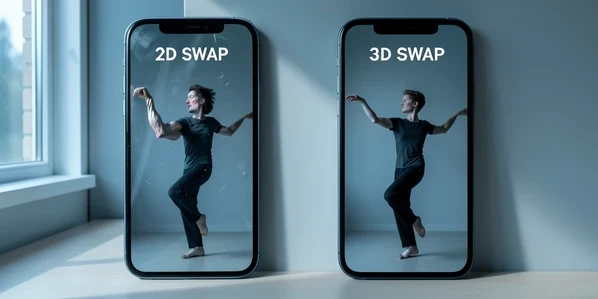
Viggle leans into the high-motion lane with 8,000+ video templates, and you can upload your own clip when none of them fit the joke. Real-time body swap also exists, the kind you would pipe into a live stream, but that is a separate streaming workflow and not what you want for a posted meme.
Make a head swap meme video step by step
Here is the repeatable version for a head-swap reaction meme. YouCam AI Face Swap works well for this and gives you 5 free credits on sign-up to test the idea.
- Find a trending reaction or classic meme template inside the tool, or upload the clip you already have in mind.
- Upload a clear, well-lit head photo. Front-facing, sharp, nothing blurry.
- Start the AI head swap and let it process, then download the finished clip.
- Share straight to TikTok, Reels, Shorts, Discord, or a group chat while the format is hot.
A concrete run-through: grab a well-worn reaction template, drop in a friend's head photo, generate, and you have a vertical clip ready to post in a couple of minutes. Because the source clip barely moves, the head sits naturally and you skip the warping problems that plague motion-heavy swaps.
Make a full body swap meme video step by step
When the whole character has to move, switch to a body swap. Viggle is the pick here, and the flow is short.
- Pick a video template from the library, or upload your own dance or action clip.
- Upload one photo of the character you want swapped in.
- Generate the body-swapped video. Viggle says it is ready to download in under a minute.
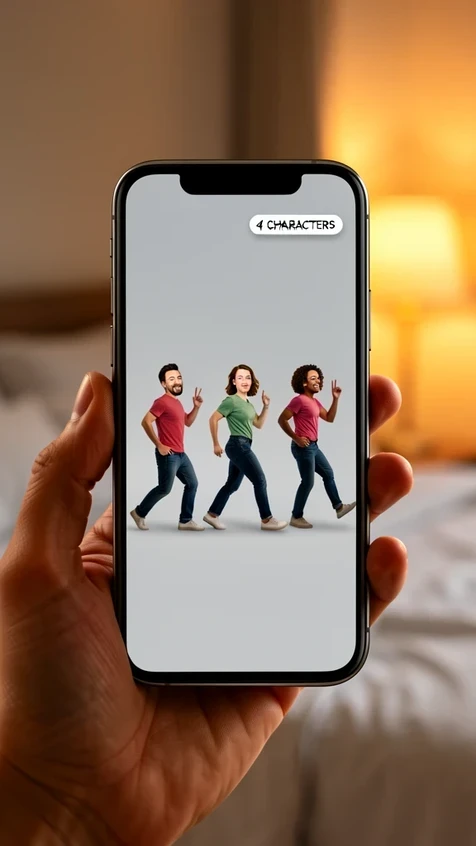
- For group memes, swap up to 5 characters in a single upload instead of stitching clips together.
Picture a trending dance challenge where a 2D face paste would smear every time an arm crosses the torso. Run it as a body swap and the new character spins, dips, and lands with the limbs intact, because the JST-1 model is replacing the body in three dimensions rather than patching a face onto each frame. That before-and-after gap is the entire reason to reach for a body swap on high-motion templates.
Speed-to-trend: ship the meme before it peaks
A meme that lands two days late is a dead meme. Speed is a feature, and these tools are built for it: the output is ready to download and share in under a minute, so the bottleneck is your decision-making, not the render.
Use that speed to test before you commit. Magic Hour suggests creating 5-10 versions for different hooks, creators, and segments to improve how a clip performs. Generate a handful of cuts from the same base swap, each with a different caption or opening beat, then post the strongest one first. Export everything vertical at 9:16 so it fills the screen on TikTok, Reels, and Shorts without awkward bars.
Fix a swap that looks bad: flicker, warping, and identity drift
Most bad swaps fail for a reason you can name and fix. Match the symptom to the cause.
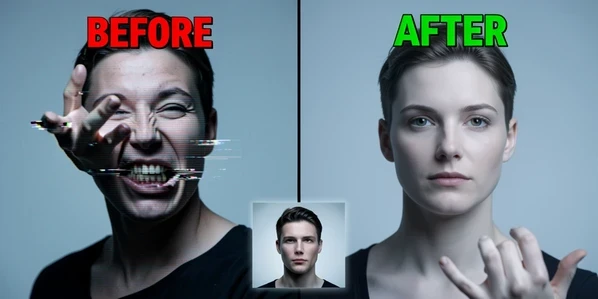
Flicker and limb warping in fast motion mean a 2D face-paste tool is being asked to track movement it cannot model, so the fix is to switch that clip to a 3D body swap. A face that looks pasted on usually comes from a mismatch: the lighting and angle of your source photo do not agree with the target clip, and the brain catches it instantly. Match them. Front-lit, high-resolution source, shot from an angle close to the clip's camera.
Identity drift, where the character stops looking like the right person partway through, comes from leaning on a single weak image. One source photo limits realism, so feed the tool a clear, front-lit, high-res face. For characters that need to stay consistent across multiple scenes, lean on multi-track character tracking so each person holds their identity through the whole clip.
Free-tier reality check: length, watermark, and quota limits
Free tiers are generous enough for memes but they have edges, and hitting one mid-project kills momentum. Know the ceilings before you start so you do not run out of generations with the trend still hot.
| Tool | Free tier | Paid or notes |
|---|---|---|
| VidMage | 100MB / 15s / 1080p | Subscribers get 1024MB / 300s / 4K |
| Viggle | Up to 5 free videos per day | Up to 5 characters per upload |
| WeFaceSwap | 30s free video per day, 15 free images per day | Files auto-deleted within 1 hour |
| YouCam AI Face Swap | 5 free credits on sign-up | Best for head swaps |
The practical read: VidMage's 15-second free cap is fine for a reaction loop but tight for a full dance, and the 1080p free output jumps to 4K only on a paid plan. Viggle's five-a-day video limit is the one to ration, because each test variation burns a generation. WeFaceSwap's daily 30 seconds of video is small, but its auto-delete makes it the privacy-friendly choice for one-off clips.
Post responsibly: consent, image rights, and your uploaded files
Swapping a real person into a meme is funny right up until it is not. HeyGen's guidance is the simple rule to follow: get consent for faces you swap, and respect copyrights and image rights. Asking first costs nothing and keeps a private joke from becoming a public problem.
Privacy cuts the other way too, toward your own uploads. Some tools, WeFaceSwap among them, auto-delete uploaded files within 1 hour and store no user data on their servers after processing, which matters when you are feeding in photos of friends. And do not pass a swap off as real. Platforms have deepfake rules, and a clip that is obviously a meme stays on the right side of them in a way a clip pretending to be genuine does not.
the whole article skips the actual problem. viggle caps you at 5 videos a day and each test variation eats one, so you cant really iterate
yeah the daily limit killed it for me too. ngl i bailed after a week
5 a day is rough when the article itself says make 5-10 versions per hook. theres your whole day gone on one meme
wait the body swap actually keeps limbs attached in fast dances? sounds fake lol
it holds up better than a 2d paste. the jst-1 thing models the body in 3d instead of pasting a face per frame, so the warping mostly goes on dance clips. not magic but real
ive seen plenty of viggle clips still smear when an arm crosses the torso though
whats the cheapest paid plan that lifts the cap? table only lists the free stuff
+1 same here
reading on lunch so quick q, for a talking head reaction do i even need viggle or is youcam enough
head swap reaction, youcam is plenty. you only want viggle when the body actually moves. dont burn a 3d tool on a still frame
ok that tracks, youcam it is
the bit that matters to me is wefaceswap auto deleting uploads inside an hour and storing nothing. only one id feed friends photos into
viggle gives like 10 free videos a day right
its 5 not 10
even at 5 the limit isnt the worst part, its identity drift. character stops looking like the person halfway through a 12s clip
thats the single weak image problem. one source photo and it drifts. front lit high res face fixes most of it, multi track if you got multiple scenes
multi track is paywalled though. so the real fix for drift sits behind the paid tier
on free tier yeah you're stuck with the single image route. cant argue that
this
still nobody saying the cheapest plan. the table is all free caps
how do you upload your own clip, is there a length limit on the free one
vidmage free is 15s, fine for a reaction loop, way too short for a full dance
15s is exactly why i quit. my dance templates run 22s and the free tier just wont take them
the speed is the one real selling point, clip in under a minute is actually true
on phone now, will redo from desktop tonight. did a youcam head swap on a coworkers laptop earlier and it came out clean
does youcam keep the uploads though. thats my hangup
no idea on that one tbh
lurker here but the consent bit at the end is the part nobody reads. swapping a real friend in is funny until they see it
reads like cover yourself legal but its not wrong
anyone actually compared vidmage 4k paid against viggle. trying to work out what to pay for
thats literally what im asking lol, nobody answers the pricing
lol
the real gap nobody mentions is audio. swap does the video fine but the original audio desync still wrecks half my clips and none of these touch it
did my first head swap today, friends head into a reaction template, posted it and got 137 likes in an hour lol
thats the easy case though. body swap is where it falls apart
right tool for the motion. low motion head swap is basically solved, high motion is where the 3d engine earns it
earns it when it works. when it drifts you've spent your daily 5 for nothing
cant disagree there
wefaceswap 30s daily is tiny but the auto delete is worth more to me than length
30s a day free is nothing if you want variations though
the free tier table is the only part i actually needed, bookmarking that
so whats the move if you want a dance clip but only get 5 free tries a day, just pay or...