
Clean head swap or creative re-composition: picking between GoEnhance and Nano Banana Pro
For a clean, usable full-head swap on a single image or a video, GoEnhance AI Head Swap is the better pick. It replaces the whole head as a component and blends the borders, so hairlines and necks stay clean and the body underneath does not shift. Reach for Nano Banana Pro when the job is a poster, a text-heavy visual, or a consistent set of images, where its re-composition strength pays off. The decision turns on edges, identity, and video, not on who renders the prettier picture.
These two tools solve the problem in opposite ways. One swaps a part. The other rethinks the whole frame. That root difference explains every trade-off below, so it is worth understanding before you pick.
Head swap vs face swap: why the difference decides the tool
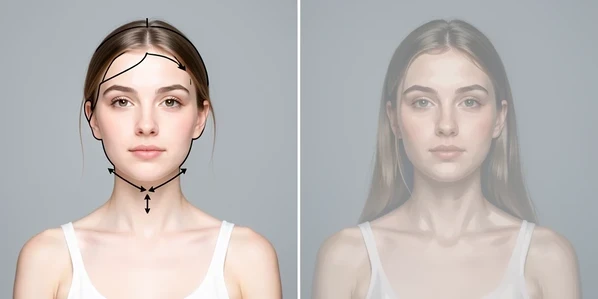
GoEnhance swaps the entire head, not just the face. Per its product page, that means the hairline, head shape, jaw, and neck come across together as one unit. A face swap only paints over the central features and leaves the donor hair and skull behind, which is exactly where most swaps fall apart. Treating the head as a single component is what keeps proportions believable.
Nano Banana Pro works differently. Built on the Gemini 3 Pro Image model, Bannerbear describes it as a 'thinking' model that reasons about lighting and composition before it renders, trading raw speed for a more considered result. It does not lift a head and drop it onto a body. It re-generates the scene to fit the instruction.
That distinction is the whole article in one line. Component replacement keeps the base image structurally stable, because most pixels never move. Re-generation can produce a gorgeous frame, but it also risks structural drift: the pose shifts, the background subtly changes, and the person you started with quietly becomes someone adjacent.
Edge cleanliness and skin-tone blend: the real head-swap differentiator
This is the axis that decides most head swaps, and it is where the tools split hardest. GoEnhance is tuned for cleaner borders around hair, jawline, and neck, and it smooths skin-tone to cut the color cast where head meets body. The neck transition blending is the part you usually fight by hand, and here it is largely handled for you.
Nano Banana Pro behaves like the painter it is. On swaps, Bannerbear reports structural drift, unstable facial details, and visible repaint artifacts, plus a frequent need for post color correction. Because it repaints rather than transplants, the new head can land a few shades off the body, and you finish the job in an editor.
Picture the same portrait run through both. GoEnhance gives you a hairline that follows the original head shape and a neck seam you have to hunt for. Nano Banana Pro can render a sharper face overall, yet leave a faint halo at the hair edge and a warmer skin tone than the shoulders below it. For a profile picture, the second result costs you another round of fixes.
Two kinds of consistency, and which one you actually need
There is an apparent contradiction here, and it trips people up. Nano Banana Pro is genuinely better at multi-image consistency: across a set of generations it preserves identity and keeps a character recognizable from frame to frame. If you need ten images of the same invented person, that strength is real and it matters.
But a single head swap asks for something else. It asks the tool to leave the base image alone and change one thing. GoEnhance does that through component replacement, so the body, pose, and lighting you photographed stay intact. Nano Banana Pro, re-composing the scene, can drift toward a regenerated look that quietly loses the original identity and style you were trying to keep.
So separate the two meanings before you choose. Multi-image identity preservation across a series? That is Nano Banana Pro. Single-swap structural stability, where the original subject must survive untouched? That is GoEnhance. Naming which one your job needs settles half the decision.
Anime, 3D, and human-to-animal head swaps
Stylized swaps are where GoEnhance is explicitly built to play, and generic image-model comparisons skip this entirely. Its head swap handles anime, 3D character, and human-to-animal jobs as distinct modes rather than one catch-all filter.
- Anime swaps keep the illustration style coherent, so the new head reads as drawn by the same hand, not pasted from a photo.
- On 3D characters the swap preserves volume and the highlight placement that sells depth.
- Human-to-animal swaps get cleaner fur and hair borders, the contour that usually frays first.
Take an original-character redesign. You want the linework and palette to match the rest of the piece, and a head that blends into the existing art. GoEnhance aims at exactly that coherence. Nano Banana Pro is stronger at broad style changes and creative re-composition, reinventing a whole look rather than performing a targeted stylized head swap. Great for concepting a new style. Less so for slotting one head into finished art.
Video head swaps: the axis most comparisons ignore
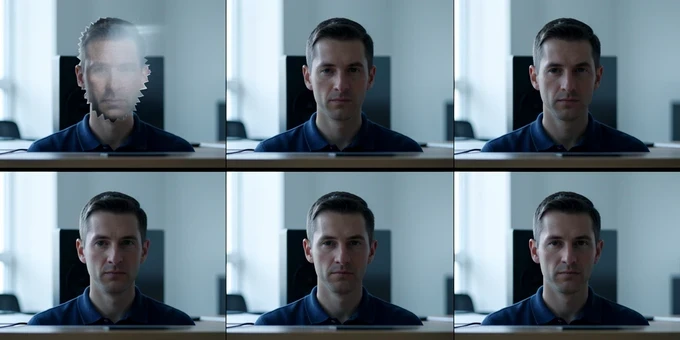
Here the question answers itself. GoEnhance offers AI head swap video with edge blending and frame-to-frame consistency built to reduce flicker. Nano Banana Pro is a still-image model. It has no native head-swap video pipeline at all, so for moving footage it is not really in the contest.
Flicker is the pain that defines video swaps. When each frame is swapped in isolation, the head jitters, the edges crawl, and the eye catches it instantly. Frame-to-frame consistency is the mechanical fix: the tool carries the swap forward instead of re-solving it cold every frame. It is the difference between a clip you can post and one that screams fake.
Creators ask this constantly. Can it swap one face across a long video? Can it change just one person in a two-person interview while leaving the other untouched? Those are video-stability questions, and they point at a tool with a real video pipeline rather than a still generator you would have to stitch frame by frame.
Effort and iteration: upload-and-swap vs prompt-and-retry
GoEnhance runs on simple upload-and-swap controls. You bring two images, point it at the head you want, and the post-edit workload stays generally light. The skill ceiling is low on purpose.
Nano Banana Pro asks more of you. Results depend heavily on prompting, extra constraints, and several iterations before a swap lands. You are describing what you want and steering the model away from drift, which is a different kind of work than dragging a file into a box. When it clicks, it is powerful. Getting it to click takes attempts.
GoEnhance is not without limits. Basic accounts render slowly and run on limited daily tokens, and you cannot swap multiple images in one go. So the plug-and-play flow is fast per image but throttled in volume, and a big batch will have you waiting or topping up.
Price, free tier, and watermark: total cost per usable result
Sticker price misleads here, because the real cost is per usable result, after cleanup. GoEnhance is free to start and charges 2 tokens to swap one image, with daily token limits and slow render on basic accounts. The headline cost is low and predictable.
Nano Banana Pro pricing depends on where you run it. The model itself runs about $0.067 per 1K image, $0.134 per 2K, and $0.24 per 4K, with output topping out around 2K resolution (roughly 2048x1080 landscape). On JAI it is 15 credits per edit with 10 free credits on signup; on ImagineArt it is 80 credits per image. The limited free tier routes non-payers to standard Nano Banana rather than the Pro model.
| Factor | GoEnhance AI Head Swap | Nano Banana Pro |
|---|---|---|
| Free tier | Free to start, limited daily tokens, slow render on basic accounts | Limited tier routes non-payers to standard Nano Banana; 10 free credits on JAI signup |
| Per-result cost | 2 tokens per swap | ~$0.067 (1K) / $0.134 (2K) / $0.24 (4K); 15 credits/edit on JAI; 80 credits/image on ImagineArt |
| Watermark | No watermark noted | Visible SynthID-style watermark on every Gemini image |
| Hidden cost | Wait time and token caps on basic accounts | Post color correction and repeated iterations to fix drift |
Two hidden costs decide the math. Nano Banana Pro stamps a visible SynthID-style watermark on every Gemini image, which is a hard problem for professional output. And its repaint artifacts pull you back into an editor for color correction. Add the watermark workaround and the cleanup time to the per-image price, and a cheap-looking image gets expensive once it has to ship clean.
Run a real multi-image project through both and it shows. Say you need a dozen clean swaps. GoEnhance costs predictable tokens per image but makes you wait and forbids batch swapping, so the bottleneck is time. Nano Banana Pro lets you push more at once, yet each image may need a correction pass and carries a watermark, so the bottleneck is post-work. Neither is free; they just bill you in different currencies.
Verdict: which to pick by job
There is no single absolute winner, and the honest answer is to pick by the job in front of you. Most credible comparisons land in the same place: match the tool to the task, because each is built for a different one.
Choose GoEnhance for portrait makeovers, cosplay and OC redesigns, profile pictures, stylized swaps across anime and 3D, and any video head swap that needs clean edges with low effort. It wins wherever the base image must survive intact and the borders have to be invisible.
Choose Nano Banana Pro for posters and covers, bold creative re-composition, text-heavy visuals where its typography shines, and projects that need a consistent set of images of one character. It wins when you are building a scene, not preserving one. Name your job first, and the tool stops being a debate.