
ChatGPT Face Swap: What Two Photos Really Become
Short answer: yes, ChatGPT can swap faces between two photos, but not the way you probably picture it. It does not lift a face off one image and stick it onto another. It looks at both pictures and generates a brand new image that blends them. That single fact explains nearly every frustration people hit, from a face that drifts off-likeness to a flat refusal partway through.
I ran the workflow on GPT-4o in May 2026 to write this. The verdict held up across attempts: ChatGPT is a strong tool for creative or stylized swaps, and a weak one when you need a real person to stay recognizable. The rest of this piece is the why, the how, and the point where you should reach for something else.
Can ChatGPT Actually Swap Faces? The Honest Answer
ChatGPT swaps faces through generative image synthesis, the same DALL-E and GPT-4o machinery behind its other image work. There is no facial-recognition step that locks onto your eyes, nose, and jaw and moves them as a unit. The model reads both photos, forms an idea of what you asked for, and paints a fresh result. So the face you get is a re-drawing of a face, not a transplant of one.
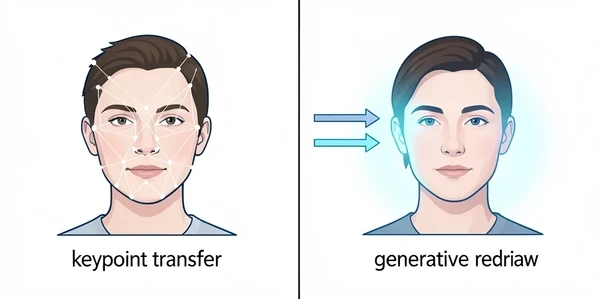
Re-drawing has a price. Likeness can shift. Expression can soften or change. Skin tone can land a shade off from either original. None of that is a bug you can patch out; it is baked into how the tool produces the image. A dedicated swapper like Remaker.ai works the opposite way. It uses facial recognition to mark key points on the face and then transfers that face across, which holds the person's identity far tighter.
Use ChatGPT when the swap is meant to be fun, stylized, or loose. Reach for a keypoint tool when the specific person has to stay unmistakably themselves.
How ChatGPT Face Swap Works: What Happens Under the Hood
Picture the difference as two craftsmen. One traces your face onto transparent film and lays it precisely over a second photo. The other studies your face, then paints the whole scene again from scratch with that face worked in. ChatGPT is the painter. Dedicated tools are the tracer.
In practical terms, ChatGPT analyzes both uploaded images and synthesizes a new picture that merges elements from each. Face swap technology in purpose-built tools, by contrast, uses facial recognition to identify landmark points and image processing to move the face region from one photo into another. Because ChatGPT rebuilds the image instead of moving a region, it can quietly introduce lighting shifts, a different expression, or a mismatched skin tone. None of those were in your instruction; they are side effects of regeneration.
Your results also ride on the model version. GPT-4o image generation produces noticeably cleaner swaps than older image modes, and free-tier accounts may hit limits or lack image generation entirely. Same prompt, different version, different output. Keep that in mind before you blame the prompt.
Step-by-Step: How to Swap Faces in ChatGPT
The mechanics are simple. Open a chat, then upload both photos with the + or paperclip icon in the message box. The first job is to remove ambiguity: tell ChatGPT which picture is the source (the face you want to insert) and which is the target (the face you want replaced). Skip that and the model guesses, often wrong.
Then write a prompt that does three things at once: names the face to replace, names the face to insert, and spells out the blending. A reliable template reads: In the second image, replace the face with the face from the first image. Match the lighting, skin tone, and keep a natural expression. Per futurebrainy.com, results usually return within a few seconds to about a minute, depending on whether you are on a Plus account with full GPT-4o image capabilities.
Input quality decides most of the outcome before the model even starts. A few habits that pay off:
- Pick frontal shots where the face looks straight at the camera, not three-quarter or tilted.
- Neutral expressions transfer more predictably than big smiles or squints.
- Keep backgrounds plain. A busy or crowded scene gives the model more to reinvent and more to get wrong.
- Try to match the lighting direction between the two photos so the blend has less to reconcile.
Worked example: I uploaded a personal headshot as the first image and a stylized movie-poster portrait as the second, then asked ChatGPT to place my face into the poster while keeping its dramatic lighting. The prompt: Put the face from image one onto the figure in image two. Keep the poster's color grade and shadows, match skin tone, hold a calm expression. It returned a poster that read as me, stylized, in roughly forty seconds. That is exactly the lane where the tool shines.
When ChatGPT Refuses: Content Policy and Real-Person Restrictions
The wall most people hit is not a bad image, it is a polite no. ChatGPT may decline a face swap that involves an identifiable real person, and the odds of refusal climb sharply for public figures. Requests touching children's faces are among the most likely to be turned down outright. The model's content policy is doing this on purpose, even if it rarely explains itself in the moment.
Phrasing moves the needle more than anything. Naming a specific celebrity is a near-guaranteed trigger. Describing a face instead of naming its owner often gets through. So does using your own photos or clearly fictional ones.
Refusal scenario: a prompt like Swap this face with [famous actor's name] tends to return a refusal citing policy on real people. The rephrase that lands: Blend the face from my first uploaded photo onto the figure in the second photo, matching the style. Same creative goal, no named individual, far better chance of success. The distinction the model cares about is identity, not difficulty.
Copyright sits underneath all of this. As futurebrainy.com puts it, respect copyright rules when you use images of celebrities or branded content. Public figures and fictional characters can be used, but stay mindful of copyright and fair use. ChatGPT's refusals enforce a slice of that automatically; the rest is on you.
Why Your ChatGPT Face Swap Looks Wrong (And How to Fix It)
When a swap comes out wrong, it usually fails in one of four ways: the face looks distorted, the skin tone clashes, the lighting does not match the scene, or the expression changed on its own. The root cause is the same for all four. ChatGPT regenerates the image, so a small ambiguity in your wording leaves room for a large visual deviation. The model fills that gap with a guess.
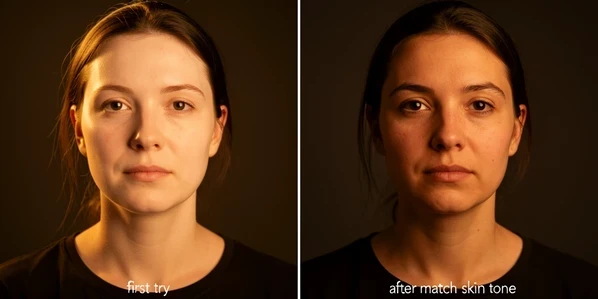
The fix is to close the gaps the model would otherwise guess at. Each line below targets one failure mode named above:
- Add match skin tone when the face reads lighter or darker than the body it sits on.
- Add adjust lighting to match the target image to kill the pasted-on look from clashing light.
- Add keep natural expression or preserve the original pose when the mood of the face mutates.
- Feed it a higher-quality frontal, neutral source photo, since distortion often traces back to a weak input rather than weak wording.
- Strip busy backgrounds out of both photos so the model spends its effort on the face, not the clutter.
Then iterate. The first output is rarely the best one. Regenerate with a tightened prompt instead of accepting attempt number one, and treat each result as a draft you are steering. Two or three rounds usually beats a single lucky shot.
ChatGPT vs Dedicated Face Swap Tools: Which Should You Use?
Pick the tool by what you are optimizing for. ChatGPT wins on convenience when you already live in the chat window. Dedicated swappers win on fidelity because they transplant rather than repaint. Here is how the three stack up on the axes that actually decide the job.
| Axis | ChatGPT (GPT-4o) | Remaker.ai | EaseMate AI |
|---|---|---|---|
| Method | Generative redraw | Facial recognition keypoints | GPT-4o powered blend |
| Likeness preservation | May drift on real people | High fidelity | Retains expressions and details |
| Signup | Account required, Plus for full GPT-4o images | No signup | No signup, 30 free credits after login |
| Watermark | None on output | None | None |
| Speed | Seconds to about a minute | Fast single-face swap | Fast |
| Privacy | Standard OpenAI handling | Standard | Files deleted after processing |
| Best fit | Creative, stylized swaps | Exact likeness, headshots | Free everyday swaps, PNG/JPG/WEBP up to 10MB |
A few specifics behind the grid. Remaker.ai needs no sign up and leaves no watermark; its standard swap works on single-face images, while photos with several faces need its Multi-Face Swap to target the right one. EaseMate AI is powered by GPT-4o, charges no fees, adds no watermark, and hands you 30 free credits after login, accepting PNG, JPG, and WEBP files up to 10MB. On privacy, EaseMate AI states plainly: "the files you uploaded will be deleted from our server after processing." That line matters if you are uploading personal photos.
So the decision rule is short. Reach for ChatGPT on creative or stylized swaps, memes, and poster redesigns, or when you are mid-conversation already. Switch to Remaker.ai or EaseMate AI when exact likeness is the whole point: professional headshots, corporate profiles, marketing materials. Take a group photo where one person blinked. ChatGPT will repaint the face and may change who it looks like; Remaker's head swap feature, built for polished headshots, is the right instrument for that repair.
What ChatGPT Face Swap Is Actually Good For
ChatGPT earns its keep wherever a loose, stylized blend is the goal and pixel-perfect identity is not. That covers more ground than it sounds.
- Memes and quick social posts, where the joke survives a little likeness drift.
- Poster redesigns and concept art, such as dropping a face into a movie-poster treatment.
- Personalized greetings, invitations, and one-off cards for friends or family.
- Broader AI creative projects where a stylized, painterly blend is the intended look anyway.
Where it falls down is anywhere the person must stay recognizable. Professional headshots, corporate profile photos, and any use case riding on a specific identity are the wrong fit. Not because the output looks bad, but because looking right and looking like them are different bars, and only the second one matters there.
Ethics and Legal Guardrails Before You Swap
Consent comes first. Before you swap a real person's face, especially for anything public, get their okay. It is the simplest guardrail and the one people skip most. Copyright is the next layer: celebrity images and branded content carry rights, and using them carelessly invites trouble even when the tool lets you.
Public figures and fictional characters are not off-limits, but they come with the same copyright and fair-use mindfulness attached. The hard line is non-consensual face swapping, sexualized deepfakes above all, which is illegal in a growing list of jurisdictions and not a gray area. ChatGPT's content policy quietly enforces part of this through its refusals, yet the policy is a floor, not your full responsibility. The judgment stays with you.
ok so before i put my actual face into openai, where does this stuff even go after? article says standard handling which tells me basically nothing
it doesnt move your face it repaints the whole image, thats the bit everyone misses. once that clicked my swaps got way better
nah for real people just use remaker, the keypoint thing holds likeness. chatgpt drifts pretty much every time i tried
@neymarjr drifts for you maybe, i ran like 18 swaps last week, well 17 the last one errored, and most were fine for what i needed
easemate having that files deleted after processing line is honestly the only row in that whole table i care about
fine for what you needed isnt the same as recognizable though. did a headshot batch for work and it quietly changed who the guy looked like
depends what youre optimizing for, the article literally says that. for creative stuff its great
anyone actually know if plus stores uploads longer than free tier? cant find a straight answer anywhere
the frontal neutral photo tip is the only real advice in here, weak input weak output
did the movie poster thing, came back in like 40s and read as me, exactly the lane they keep describing
i wont drop a coworkers face in there without asking, people skip the consent part way too easily
remaker multi face swap is underrated tbh, the single face one trips up on group photos
had a refusal once on a totally fictional character which made no sense, long story
skimmed the ethics part ngl, reading on lunch, but the deepfake line is the one that actually matters legally
skin tone always lands a shade off for me. adding match skin tone helps maybe half the time
you have to iterate, first output is never the one. 2 or 3 rounds usually gets there
wait, does it refuse celebrities every time or just sometimes? mine went through once which kinda surprised me
describe the face dont name them, thats the whole trick. naming a celeb is an instant no
idk man the refusals feel random sometimes, same prompt different day different result
that privacy column just saying standard openai handling is doing a lot of heavy lifting
for memes sure use chatgpt, for anything someone pays you for switch tools. not that complicated
i still reach for it first cause im already in the chat, convenience wins more than people admit
the version thing is real too, free tier gave me nothing close to the 4o output
kyle and i just land different on this, neymar i mean, anyway fun yes identity work no
so does anyone actually trust files deleted after processing or is that just a line on a page somebody wrote once