
Your Gemini face swap keeps giving you a stranger. Here is the real fix.
Short answer first. Gemini does not lock facial features, and a Google policy update in August and September 2025 explicitly prohibits face swapping and copying real faces. The model was retrained to produce generic faces rather than reproduce yours. Some of the mismatch is fixable through a cleaner reference photo and tighter prompt language. Some is a hard policy wall, and no prompt wording moves it. The fastest way to stop wasting generations is to diagnose which one you are hitting before you retry.
Why Gemini keeps changing your face (the real reason)
Most users assume this is a bug. It is not. Gemini reinterprets the face from scratch on every generation because it prioritizes overall image quality and realism over identity consistency, as documented by Media.io's breakdown of Gemini face-change behavior. There is no internal face-lock step. The same upload and the same prompt can still return a different person.
On top of that, Google tightened its rules in late summer 2025. The updated policy, explained by Promptshelf's writeup on the Gemini face issue, bans face swapping, copying real faces, and generating images that look too much like a specific person. Gemini was retrained as a direct consequence. The model now ignores the identity in your reference photo and produces any plausible face, not the face you uploaded.
Safety guardrails sit on top of that training. They can block the request outright, return a policy error, or silently substitute a different face without warning. That silent substitution is the cruelest version. The image arrives, it looks good, and only on the second glance do you see it is not you.
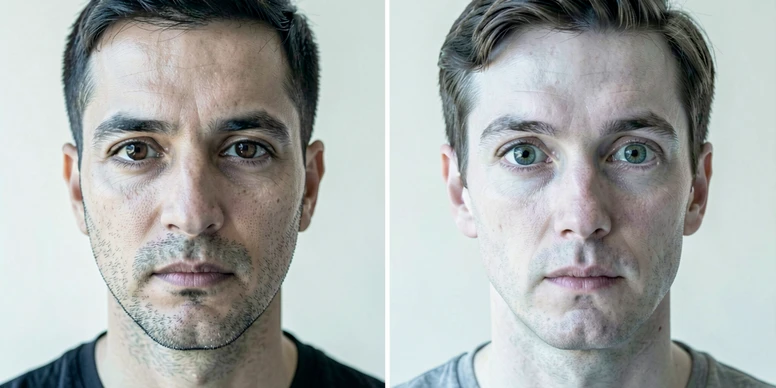
Quick diagnosis: which cause applies to you?
Before you retry anything, figure out which bucket you are in. Four causes dominate, and the fix for one does nothing for another. Run down this list honestly.
- Cause A. Your reference photo is the problem. It is filtered, angled, shot through sunglasses, cropped too wide, or dim.
- Cause B. The prompt asks for several transformations at once (new outfit, new pose, new lighting, new background), and the face drifts under the load.
- Cause C. The prompt uses first-person phrasing like "me" or "my face," which nudges the safety filter even when the request is harmless.
- Cause D. Gemini is blocking the whole category. You see an error, or the face swaps no matter what you type. This is the policy wall.
Here is the decision point. If you are in Cause D, stop rewriting prompts. No wording change will fix a policy-level block, and every retry burns time. Skip straight to the tool-switching section below. If you are in A, B, or C, keep reading in order.
Fix 1: Improve your reference photo (Cause A)
AI does not see a face the way you do. It reads brightness values, color gradients, and the shape relationships between landmarks. Promptshelf describes this bluntly: the model processes faces as numerical patterns, and when the crop is wrong, the light is poor, or the angle is off, it simply cannot recognize the same person twice. Garbage input gives garbage identity. This is the cheapest fix and the one most people skip.
What a good reference looks like:
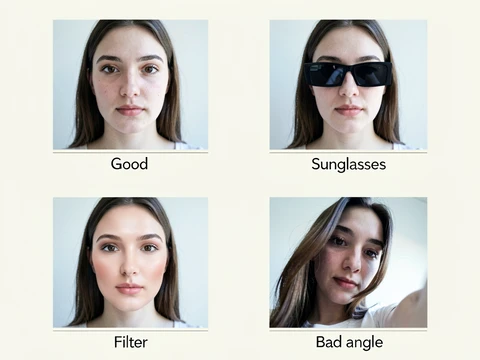
- One photo, front-facing, eyes level with the camera.
- Neutral daylight or soft indoor light. No harsh shadow across half the face.
- No beauty filters, smoothing, skin-tone shifts, or heavy retouching.
- Sunglasses off. Hats off if the hairline matters to your identity.
- Crop in so the face fills most of the frame. Background is noise the model does not need.
- A natural expression. An exaggerated grin or a squint changes the landmark geometry and confuses alignment.
Why this actually works at the mechanism level. The model runs a landmark-detection step (eyes, nose tip, mouth corners, jaw points) and an alignment step before it uses any of that information downstream. A 45-degree angle tilts those landmarks out of the frame the aligner expects. Sunglasses wipe out the eye landmarks entirely. A strong filter flattens the skin-tone gradient the model uses to separate face from hair. Fix the input, and the face you get back lands closer to the one you sent in.
Fix 2: Rewrite your prompt to reduce facial drift (Causes B and C)
The prompt is where most of the drift happens. Two moves matter more than everything else: pin the face down with explicit language, and change only one thing at a time.
Pin the face down
Add a preservation clause that names specific landmarks. Media.io found that instructions such as "Do not alter face shape, eyes, nose, or jawline" and "Change only the background and lighting, not the face" measurably reduce drift. Vague phrasing like "keep the face the same" is less effective because the model has no anchor for what "the same" refers to. The landmark list gives it something to hold.
Some users on YouTube and community threads have had luck with a blunt anchor phrase: "Keep my face same 100% as in the reference image." It is not elegant, but it shows up often in threads where users reported the face actually carrying over. Worth trying. It is not magic.
Drop the first person
Words like "me" and "my face" are identity claims. Promptshelf notes that these phrases can trigger Gemini's safety filters because the guardrails are tuned to identity-referencing language. Rewrite with "this person" or with physical descriptors, for example "a man with an oval face, dark brown eyes, and short black hair." The request becomes a generation about a described subject, not about a specific real individual, and the filter is less likely to flinch.
Change one variable
Every simultaneous change is another chance for the face to drift. Media.io confirms the pattern: large creative jumps increase facial drift even with good prompts. Pick one axis per generation. Change the background only, then in the next pass change the outfit, then the lighting. Reuse the same reference photo each time. The face stays closer because the model is doing less work.
Safer phrasings that slip past the filter
If direct requests keep bouncing, try softer framings. "Create a version of this person as a firefighter." "Show a character inspired by this photo as a medieval knight." These cast the generation as stylized or character-based rather than as a literal edit of a real individual. The filter reads them more generously.
Before and after
Before: Put me in a forest wearing a suit at sunset. After: Using the uploaded photo, place this person in a forest. Change only the background to a forest at sunset. Do not alter face shape, eyes, nose, jawline, or skin tone.
The "before" version fails on three fronts at once. It uses "me." It stacks four changes (location, outfit, time of day, lighting). It gives the model no preservation anchor. The "after" version fixes all three in a single rewrite.
| Lever | Weak version | Stronger version |
|---|---|---|
| Identity language | Put me in a… | Place this person in a… |
| Scope | Change the background, outfit, pose, and light | Change only the background |
| Face preservation | Keep the same face | Do not alter face shape, eyes, nose, or jawline |
| Framing | Make a photo of me as a knight | Show a character inspired by this photo as a knight |
Honest note. These rewrites reduce drift. They do not guarantee it is gone. Even a clean photo with an ideal prompt can still produce a face that is 80 percent right and 20 percent someone else. That is the ceiling of what Gemini can deliver today.
When Gemini cannot fix it: the policy wall (Cause D)
If your prompts keep bouncing with a specific error, you are not doing anything wrong. You have hit the wall. The message looks like this:
I can create images of real people, but not one like that. Can I help with a different image of this person?
That is a policy block, not a prompt error. The August and September 2025 Google AI rules explicitly prohibit taking a face from one picture and placing it in another, and Gemini is now trained to refuse the request. Rephrasing does not help. Swapping synonyms does not help. There is no secret word. The model was tuned on the policy, and the refusal comes from the training itself, not from a keyword filter you can route around.
Even when the request does go through, remember the ceiling from the previous section. Prompt fixes lower the amount of drift. They do not eliminate it. If your use case needs full identity consistency, for a resume photo or a LinkedIn headshot or a product page, Gemini is the wrong tool. Stop retrying.
When to switch tools and what to use instead
Switch when either condition is true. You see the policy error message. Or you applied Fix 1 and Fix 2 cleanly, tried three or four generations, and the face is still off. Staying in Gemini past that point is a tax on your afternoon.
What to use instead depends on the job. For creative work where some drift is tolerable, DALL-E, Midjourney, Leonardo AI, and Stable Diffusion all handle reference images with more face fidelity than Gemini does today, per Promptshelf's alternative-tool notes. Verify current features and pricing on each tool's own page, since those details move month to month.
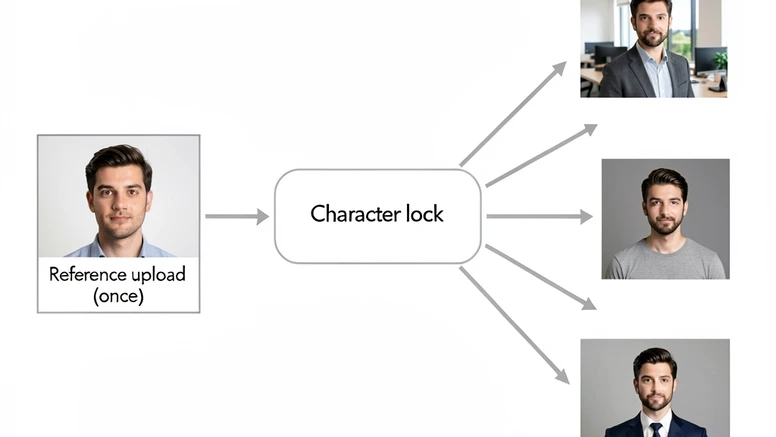
For professional headshots, look for something more specific. Media.io recommends a character-based workflow: a dedicated tool that locks your face identity at the moment you upload, then lets you generate many images (different outfit, different backdrop, different crop) without re-uploading the reference each time. That upload-once design removes the main source of drift, because there is no reinterpretation step between generations. The model reuses the same identity tensor it built on the first pass.
A quick cost footnote. Gemini has a free tier you can keep using for non-identity work. Character-consistency tools often sit behind a paid plan. Check the pricing page before you commit, because free trials and watermark policies shift frequently.
A short checklist before you give up
- Front-facing, unfiltered, well-lit reference photo, face filling the frame.
- No "me" or "my face" anywhere in the prompt.
- Only one variable changing per generation.
- Explicit preservation clause naming face shape, eyes, nose, and jawline.
- If the policy error appears, stop and switch tools.
Keep this checklist as a prompt template you paste in by default. Building the face-preservation clause into muscle memory saves more retries than any other single habit. And treat each Gemini pass as one experiment with one variable, not a wish list.
ok so i tried the landmark thing yesterday and got my face back like 70% of the time? felt like real progress tbh
70% isn't getting your face back lol that's getting someone who looks vaguely like you
did anyone actually find the exact policy doc? article cites promptshelf and media.io but those are third party writeups, not the policy text
the policy page is on the gemini app help section, was updated end of august 2025. the wording is more about not generating images that resemble identifiable people, the face swap line is a downstream interpretation
lol i just wanted to put my dog in a santa hat why does this need a whole essay
so the alternative is pay for one of those character-lock tools? what does that even cost
leonardo's character feature is around 10 bucks a month last i tried, midjourney's --cref works on the v6 standard plan. dalle through chatgpt plus same 20 bucks. none of them is free for this
wait the article said midjourney too? i thought midjourney also refused face stuff
midjourney refuses too if you ask for a specific person. they all do. article is glossing over that
+1, every tool has the same wall now
honest question, why are people uploading their face to google's servers at all? whatever your generation comes back as, your reference photo is sitting on a training pile somewhere
google says reference images aren't used for training on the consumer free tier per their data policy update, but the workspace plans are a different story. worth checking the specific tier you're on
checked it a year ago, might be different now, but they retain prompts for human review for some window. the 'not used for training' framing was always narrower than the headline
i burned through 23 generations before i realized it was just substituting random faces. no error, no warning, just a stranger that almost looks like me from the corner of my eye
the 'almost looks like you' thing is the worst. brain doesn't even register at first scroll
the 'this person' rewrite trick actually helped me get fewer policy errors. went from like 4 refusals out of 10 to maybe 1
the rewrite trick is just shifting the surface, you're not changing what the safety classifier sees underneath. it's not a fix, it's an evasion that the next training pass will close
right, and there's no public commitment from google about face fidelity being a feature they'll add back. so the article's 'today' caveat is doing a lot of work
honestly i just gave up and used my actual photo on linkedin
smartest comment in this thread
for actual headshot work the photographers i know charge like 80 to 137 dollars for a session and you walk out with usable photos same day. genai is not in that lane yet, no matter what these tools claim
yeah but who's paying 137 for a linkedin pic in 2026
people who don't want to look like a melted version of themselves on their CV
had a case once where character-lock generated 40 consistent images and then on image 41 the eyes drifted and it never recovered for that session. long story
is the drift on image 41 documented anywhere? haven't seen anyone benchmark consistency degradation over a session length
yeah no, nobody really posts session-length tests for these. would be a useful blog if someone bothered
the checklist at the end is fine but item 4 is doing all the work. the other items are common sense
the preservation clause is the actual lever, the rest is hygiene
hygiene that you only learn after you've already wasted 30 generations getting nothing
the safety filter doesn't just block, it silently substitutes. that part of the article is the only thing that surprised me, and it's also the most damning
silent substitution is what i'd consider a defect, not a feature
from a product standpoint it's defensible because returning a refusal generates support load and a substituted image keeps the user inside the funnel. doesn't make it right
so we're the funnel
i kinda want to try the 'character inspired by this photo as a knight' framing now just to see if it works
it works until it doesn't, and then you'll be on retry 12 with the same vague stranger looking back at you
stable diffusion with an ip-adapter face module is still the most reliable path if you can run a local setup. higher learning curve, no policy wall
local setup is a different sport entirely, half this thread doesn't have a gpu
speak for yourself i have a 3060, just don't have the patience
the ip-adapter face module pairs with insightface for the embedding step. accuracy depends a lot on the reference batch you give it, not just one image
and then you spend a saturday afternoon installing python deps instead of just having a usable headshot
that's the actual tradeoff in 2026. either pay for managed consistency or own the pipeline. gemini was never going to bridge that for free
the article doesn't really address what happens when the policy shifts again. anyone tracking the october update they hinted at in the gemini app changelog?
wait is there an october update coming, where'd you see that?