
Face swap refused in ChatGPT? Diagnose the cause, then fix it
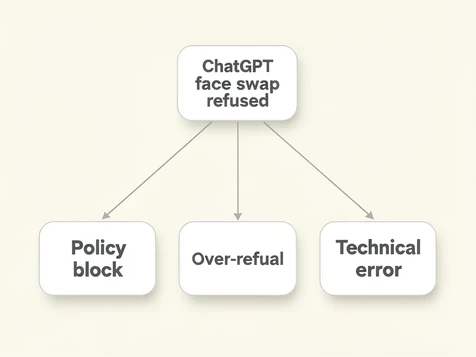
A refused face swap in ChatGPT comes from one of three causes, and each needs a different fix. A hard policy block stops any request that looks like swapping or replacing a specific person's face, and no amount of retrying clears it. A soft over-refusal fires when innocent wording trips the safety filter, and rewording usually solves it. A technical fault (session timeout, rate limit, server outage) fakes a refusal while having nothing to do with content policy. Match your symptom to the right category first, then jump straight to its fix. Everything below applies to GPT-4o image generation in the web app and the iOS and Android apps.
What kind of refusal are you seeing? (Decision tree)
Read your symptom against these three branches and you will know which fix section to open.
- Got a written message declining the request? That is a policy or soft refusal, so head to the reframing sections.
- If the chat freezes mid-generation or quietly resets with no text at all, suspect a silent safety-filter block or a session error.
- 'Something went wrong' or 'Network Error' on screen means a technical fault that has nothing to do with what you asked.
The same prompt can sail through in one session and fail in the next. ChatGPT's image model is non-deterministic, and session context shifts what the safety filter sees, so an occasional failure does not always mean a permanent policy block.
| Refusal type | What you see | Jump to |
|---|---|---|
| Hard policy block | Clear text refusal naming face alteration; retrying always fails | Hard policy refusals |
| Soft over-refusal | Vague 'I can't assist with that', a freeze, or a silent reset | Soft refusals and over-refusals |
| Technical error | 'Something went wrong', 'Network Error', or a blank response | Technical errors that look like refusals |
Hard policy refusals: why ChatGPT blocks face swap requests
ChatGPT blocks these requests because OpenAI's systems read them as identity manipulation. Ask it to replace, generate, or graft a specific real person's face, and the request is treated as an attempt to misrepresent someone, so it refuses regardless of how innocent your reason is. OpenAI sets this out in its usage policies, which restrict using its tools to impersonate or alter a real individual's likeness.
Editing and swapping are not the same thing to the filter. Touching up lighting, smoothing a blemish, or adjusting the expression on your own portrait counts as face editing, and it usually passes. Lifting one person's face onto another body, or fusing two uploaded faces, is face swapping. That is what reliably draws a block.
Three patterns trip the hard block almost every time:
- A celebrity or public figure named anywhere in the prompt.
- Two different people's photos uploaded together with a request to merge their faces into one image.
- Any phrasing that asks to make someone resemble a named person.
I'm not able to create or modify images in ways that alter a specific person's facial identity.
That wording is the identity-manipulation clause talking. It names 'a specific person' and 'facial identity', the exact concepts the policy protects. When you see language like this, or the shorter 'I'm sorry, I can't help with that request', the block is structural rather than situational.
Retrying will not move a hard refusal. The model is not hesitating; it has classified the request as out of bounds. Your only routes are reframing it into a genuine edit (next section) or switching to a tool built for swaps.
Soft refusals and over-refusals: when ChatGPT is being overly cautious
An over-refusal is ChatGPT declining a request it should allow. Ask it to 'keep my face the same but change the background' and it sometimes balks, not because the edit breaks policy, but because the wording pattern looks close enough to a restricted one. The filter errs toward caution and a legitimate face-editing prompt gets caught in the net.
These blocks look different from hard refusals. The model may freeze partway through a response, the chat may reset without naming any policy, or you get a flat 'I can't assist with that' with no clause cited. Vagueness is the tell. A hard block tends to explain itself; a soft one just stops.
Your thread's history feeds the decision too. One earlier prompt about a celebrity, or anything sensitive, can prime the filter so that an innocent face-lighting tweak two messages later gets refused. A real example: a soften-the-shadows request fails in a thread that earlier discussed a famous actor, then the identical prompt succeeds in a fresh chat seconds later. The fix is blunt. Open a new chat and the clean thread carries none of that baggage.
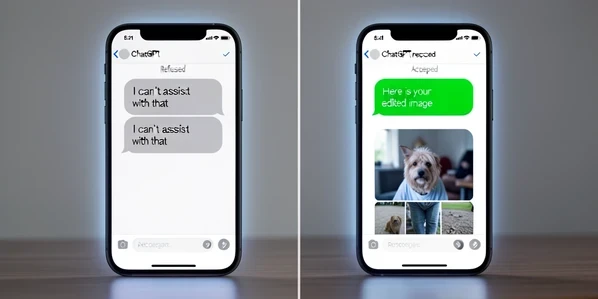
Reframing works for soft refusals because you change what the filter sees, not what you want. Swap the verb. 'Preserve the facial features exactly as shown' reads as protection; 'swap the face' reads as replacement. Recast the whole request as a background, lighting, or style change. And drop the loaded tokens entirely: 'face swap', 'replace face', and any person's name.
Prompt rewrites: compliant alternatives that work
The pattern behind every working rewrite is the same: tell ChatGPT what to keep, not what to remove. Anchor the subject as 'the person in this image' instead of a name, and describe the change as something done around the face rather than to its identity.
| Goal | Rejected prompt | Compliant rewrite |
|---|---|---|
| Consistent face across images | Swap my face into this new photo | Preserve the facial features of the person in this image exactly and place them in a new outdoor setting |
| New hairstyle | Replace this face and give it short curly hair | Keep this person's face identical and change only the hairstyle to short curls |
| Different background | Swap my face onto a beach photo | Maintain the person's face exactly as shown and change only the background to a beach scene |
| Lighting or expression edit | Change this person's face to look happier | Keep the same person's facial identity and adjust the lighting to warm golden hour with a gentle smile |
GPT-4o's image editing leans on the photo you upload as its single face reference. Give it one image and a preservation prompt, and it has a clear anchor to work from. Add a second face photo and refusal probability jumps, because two faces plus an edit instruction reads as a swap between people.
None of this rescues a request that needs a second real person's face. That is a hard policy limit, not a wording puzzle. No rewrite makes ChatGPT fuse two strangers into one portrait, so stop spending attempts on it and reach for a dedicated tool.
Technical errors that look like refusals
Some 'refusals' never touched the content policy. The request died for a mechanical reason and only looked like a block. Five culprits account for most of them, and each has a one-line tell.
- Session timeout: leave the tab open too long and your authentication token expires, so messages quietly stop sending or the page reloads itself. Log out and back in to mint a fresh token.
- Free-tier rate limit: too many image prompts in a short window trips the usage cap, and ChatGPT goes silent on image requests even while text still answers. Wait for the reset or move to Plus.
- Server overload: during peak hours or right after a big OpenAI release, generation fails instantly or stalls halfway because demand is swamping the servers.
- Conversation too long: a sprawling thread can push past the context the model will process, and it starts refusing to continue. A new chat clears it.
- Browser extension conflict: ad blockers and privacy tools can silently kill the scripts ChatGPT needs to upload or render an image. Incognito mode strips extensions out, so it isolates this fast.
Here is the trap in action. A free-tier user uploads a portrait, the generation freezes halfway, and they assume policy killed it. The real check takes seconds: send a plain text prompt. If text answers but images stay dead, it is the rate limit, not the filter, and the fix is to wait it out or upgrade.
Step-by-step fix sequence for technical errors
Once you have ruled out a policy block, run these in order and stop at the one that works.
- Check the OpenAI status page for active outages or degraded image generation. Degraded means slow or partial image output; a full outage means it is down for everyone. Either way the fix is patience. If that page itself will not load, Downdetector is a quick third-party confirmation.
- Open ChatGPT in an incognito window. If it suddenly works, a browser extension or cached data was the cause, so clear your cache and cookies or switch off extensions one at a time.
- Log out and back in to refresh the session token. This clears expired tokens and conflicts from being signed in on several devices at once.
- Start a new chat thread to drop a bloated context window and shed any history that has been escalating the safety filter.
- Turn off your VPN, or switch its region to the US or UK, since some VPN IP ranges are blocked by OpenAI.
- On a school or office network, switch to mobile data or a personal hotspot, because these networks often block ChatGPT's endpoints outright.
- Free-tier and capped out? Wait for the reset window, or upgrade to Plus for priority access when demand spikes.
Mobile-specific fixes (iPhone and Android)
App users hit failure modes browser users never see, and most clear in seconds. Force-close ChatGPT and reopen it first, which wipes the in-memory session state behind a stuck upload.
An outdated app is a common, invisible cause. Open the App Store or Google Play and check for a pending ChatGPT update, because older builds frequently choke on image uploads. If a photo upload returns a blank response or freezes the app even after updating, load ChatGPT in your mobile browser as a fallback. It runs the same account on a different code path.
Network type matters on mobile too. On a locked-down school or office connection, drop to mobile data to dodge the block. The reverse also holds: if your mobile signal is weak, hop onto WiFi so the upload has the bandwidth to finish.
When nothing works: alternatives and escalation
If your actual goal is a true face swap, replacing one person's face with another's, ChatGPT will never do it. That sits outside its content policy no matter how you phrase the prompt, so the realistic move is a different tool. Adobe Firefly handles style-based and lighting-driven face edits, and purpose-built face swap apps exist for the swap itself.
When you are sure a refusal was a false positive, tell OpenAI. Press the thumbs-down button on the refused response and pick the option flagging that the request was unnecessarily refused. That feedback feeds the data OpenAI uses to dial back over-refusals, so it genuinely moves the needle over time.
One last case looks like all the others but is not. If your account got restricted for unusual activity, every request fails and no rewrite or browser trick changes that. Contact OpenAI Support directly. An account-level block is resolved by people, not prompts.
A few habits keep these refusals from coming back.
- Lead every face prompt with preservation words like 'keep identical' or 'maintain', never 'swap' or 'replace'.
- Run face-editing in its own fresh thread, away from any sensitive topic.
- On free tier, space your image requests out so you do not trip the cap mid-session.
- Clear your browser cache about once a month to stop stale data from faking a technical error.